Sbl.so is an AI-powered B2B outreach platform. It automates end-to-end sales conversations on LinkedIn and WhatsApp — not just the sending, but the replies, follow-ups, objection handling, and qualification too.
Here is what happens when you run a campaign on Sbl.so:
You define your target audience and connect your LinkedIn profile or WhatsApp number.
The platform sends personalized connection requests or messages to your prospects.
When someone replies, the AI takes over — it understands context, handles objections, attaches files, and sends voice notes where relevant and – books calls.
If a conversation needs a human touch, it flags it for you under “Human Intervention.”
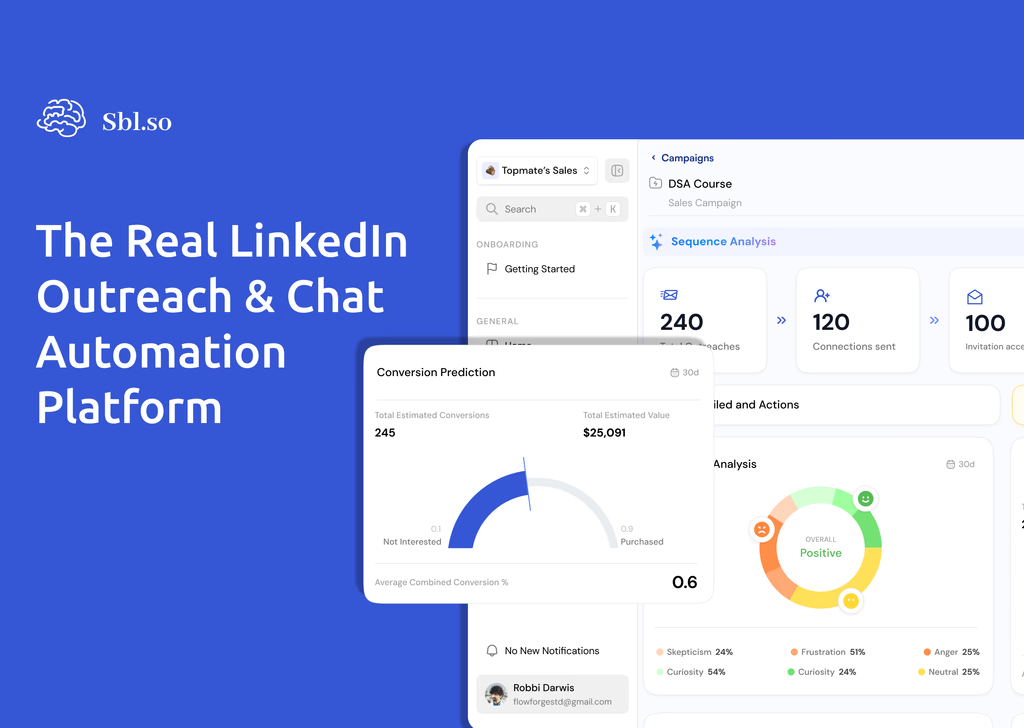
You get a full analytics dashboard showing sentiment, conversion rate, hot leads, and insights you can use to improve.
Think of it as your always-on sales rep that works 24 hours a day — and gets smarter with every campaign you run.
Supported platforms: LinkedIn and WhatsApp. LinkedIn campaigns operate within safe limits (up to 200 connection requests per week per profile). WhatsApp campaigns have no monthly outreach limit but require a verified Meta Business Manager.
Before You Launch: Infrastructure Checklist
Getting this right before your first campaign will save you a lot of time later.
Connect your LinkedIn profile — Go to the Persona tab or, Account Settings and connect the account you want to send from. You can use your email/password or log in via the browser extension.
Set your working hours — Click the calendar icon next to your profile to set your time zone, active days, and daily invite limit. A standard setup is Monday–Friday, 9am–5pm, 25 invites per day.
Train your Knowledge Base – Put all your important contextual resources for SBL to learn from it. It could be your FAQs, Landing Page, PDFs, etc.
Add Fractional SDR profiles — These are real human profiles. Each profile sends up to 200 connection requests per week and 200 messages per day. SBL auto-enforces all limits. New profiles ramp up over three weeks: 20/day in week one, 50/day in week two, full capacity in week three.
Pro tip: The more profiles you connect, the more scale you get. Ten Fractional SDR profiles = 2,000 connection requests per week. Start with one or two and add more once your campaign messaging is proven.
Step 1 — Creating Your Campaign
Once you log in, you land on the Campaigns tab. You will see a set of campaign suggestions tailored to your profile. If one fits what you need, click it. If not, click Create New Campaign.
The Campaign Prompt
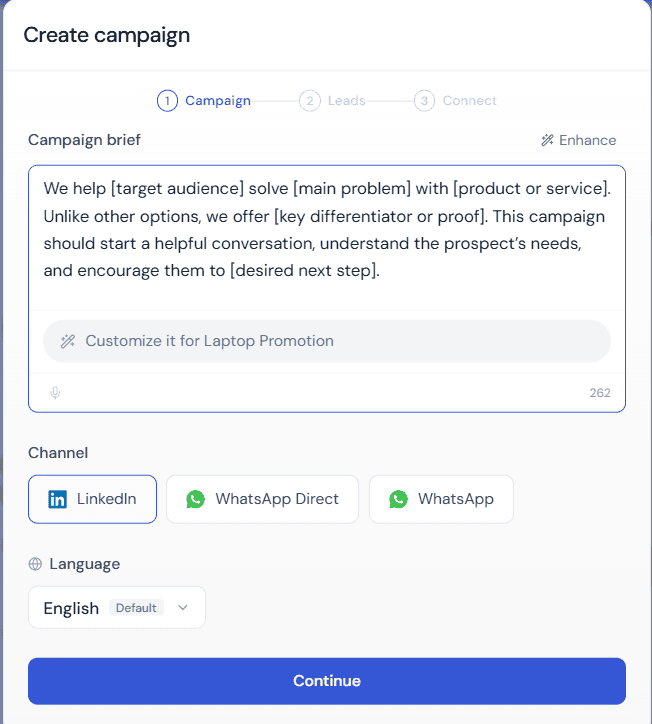
A modal appears asking you to describe your campaign objective. This is the single most important input in your entire setup. The more specific and detailed your description, the better the campaign Sbl.so generates for you.
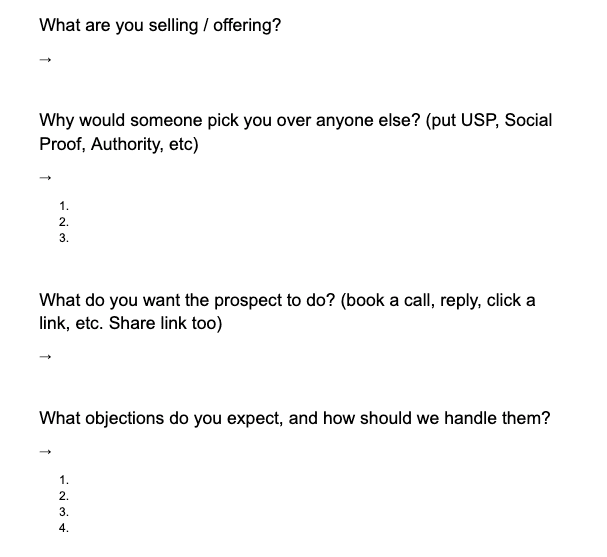
To make this easy, Sbl.so provides a Scratchpad — a Google Doc template with pre-built questions. Click on it, make a copy, fill in the answers, then paste the whole thing back into the prompt field. The template covers:
Once you have filled this in and selected your channel (LinkedIn or WhatsApp), click Create Campaign. Within seconds, Sbl.so generates a complete outreach campaign for you — including messages, follow-ups, and a chat flow. You can then edit and optimize every piece of it.
Step 2 — Setting Up Your Persona
The Persona is the identity the AI uses when chatting with your prospects. Getting this right makes your outreach feel human and credible.
For LinkedIn
To connect a profile: go to the Persona tab → Click “Connect Profile” → enter your LinkedIn email and password → click Login. Your account will be connected in a few seconds. You can connect as many profiles as you need.
Your persona is automatically created from your connected LinkedIn profile.
For WhatsApp
WhatsApp personas are fully customizable. You define:
Persona Name — Choose something natural and easy to remember. Example: “Shruti” or “Aryan.”
Persona Role — This is the job title the AI introduces itself as. Align it with your campaign. Example: “Product Consultant,” “Community Manager,” or “Career Coach.”
Training Your Communication Style
To train your persona to adapt your exact writing style. You have the flexibility to add your communication style. Under your “Persona” Tab, when you click your persona name, in the form, you can find an option of “Communication style guide”
Whatever you instruct into the input, the AI adapts to that writing/communications style and talks the way you are!
Training Your Voice
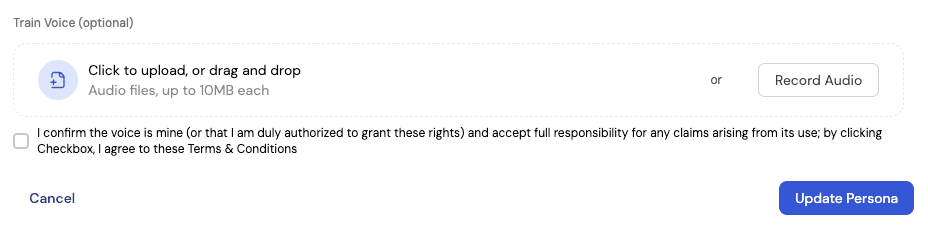
For setting up your voice. Go to the Persona tab → click on your connected profile → click Train Voice. Record 30–60 seconds of natural speech — anything you want. Sbl.so uses AI to clone your exact tone. Once saved, every voice note your campaign sends will be in your voice.
After training, click the Preview button to hear how it sounds. You can tweak settings and re-record until it is right. Click Update Persona to save.
Step 3 — Your Outreach Sequence
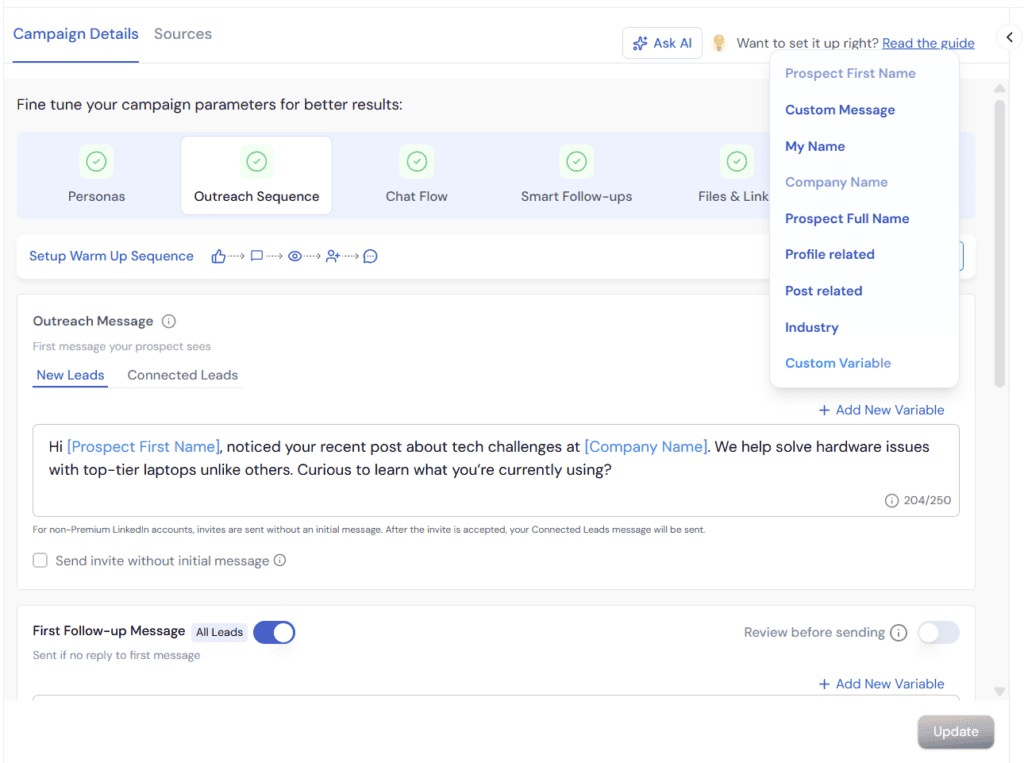
Go to the Outreach Sequence tab. This is where you set up your messages — the initial outreach, follow-ups, and optionally a warm-up sequence that runs before your message is sent.
The Two Message Types
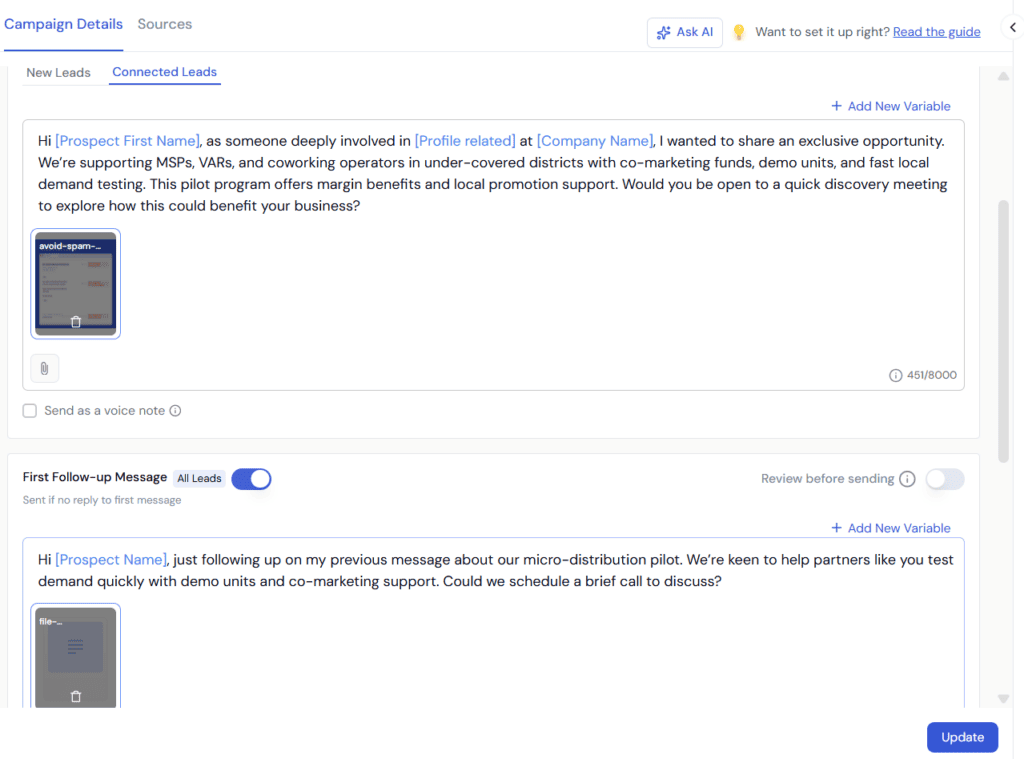
New Leads — Messages sent to people who are not yet connected with you.
Your connection request can include a personalized note (the default), or you can send the request without a note and only deliver the message once they accept.
Connected Leads — Messages sent to people who are already your first-degree connections. These skip the connection request entirely and go straight to the message.
Smart Variables
Click Add New Variable in the top right of the message editor. These are dynamic variables that personalize your message before it is sent:
Post Related — Scans the prospect’s recent LinkedIn posts and finds relevant trigger points. You can narrow it: for example, “Post Related on B2B” will find triggers specifically from posts about B2B topics.
Profile Related — Analyzes the prospect’s LinkedIn profile and identifies the most converting trigger based on what they do and where they work.
Industry Related — Pulls context from the prospect’s industry to personalize your opening.
Company Name, Prospect Name, My Name — Standard personalization variables.
Rich Media in Messages
You are not limited to text. Sbl.so supports:
Images and videos — Click the attachment icon and upload directly from the message editor.
PDFs — Attach case studies, brochures, or pricing docs to send during outreach or in follow-ups.
Voice notes — Toggle “Send as voice note” to convert your written message into a cloned audio message in your own voice.
Warm-Up Sequences
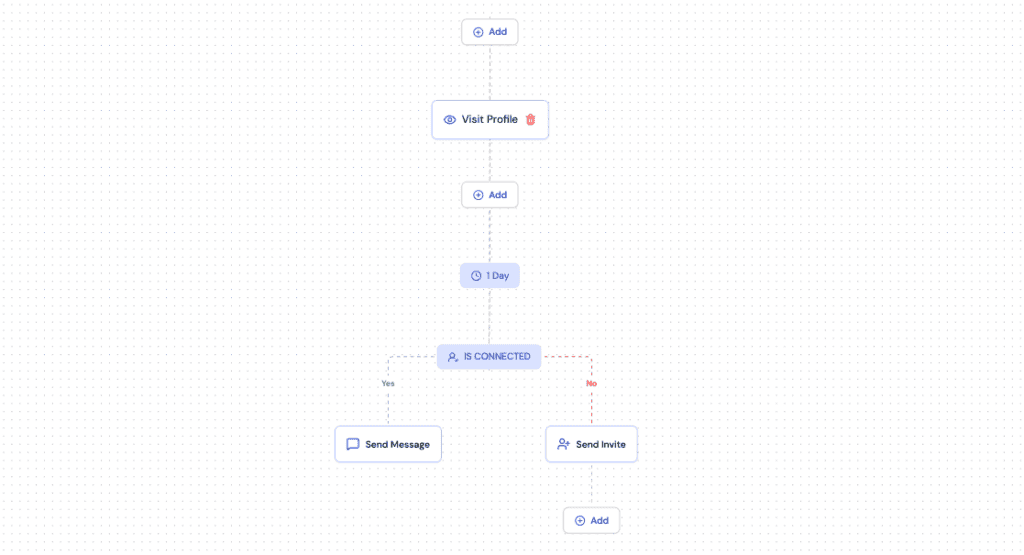
Before your outreach message goes out, you can set up a warm-up sequence to create a more natural engagement pattern. Click Add Sequence.
Example warm-up sequence:
Like the prospect’s most recent post → wait 30 minutes
Visit the prospect’s profile → wait 40 minutes
Send the connection invite
This sequence also handles whether someone is already connected. If they are, the outreach message is sent immediately. If they are not, the connection invite goes out first, and the message is sent once they accept.
You can also add Withdraw Connection — if someone does not accept your invite within a set number of days (e.g., seven days), the request is automatically withdrawn to keep your pending queue clean.
Warm-up sequences are optional. If you want to go straight to the message, simply skip this section.
Follow-Up Messages
You can add as many follow-up messages as you want, each with its own delay timing.
Standard setup:
Follow-up 1: Two days after the first message
Follow-up 2: One week after follow-up 1
Follow-up 3: Optional, 10–14 days later
Each follow-up can also use smart variables, rich media, and voice notes. Never re-pitch in a follow-up. Add a new angle, share social proof, or offer a different entry point into the conversation.
Click Update after making any changes to apply your settings.
Step 4 — Chat Flow Setup
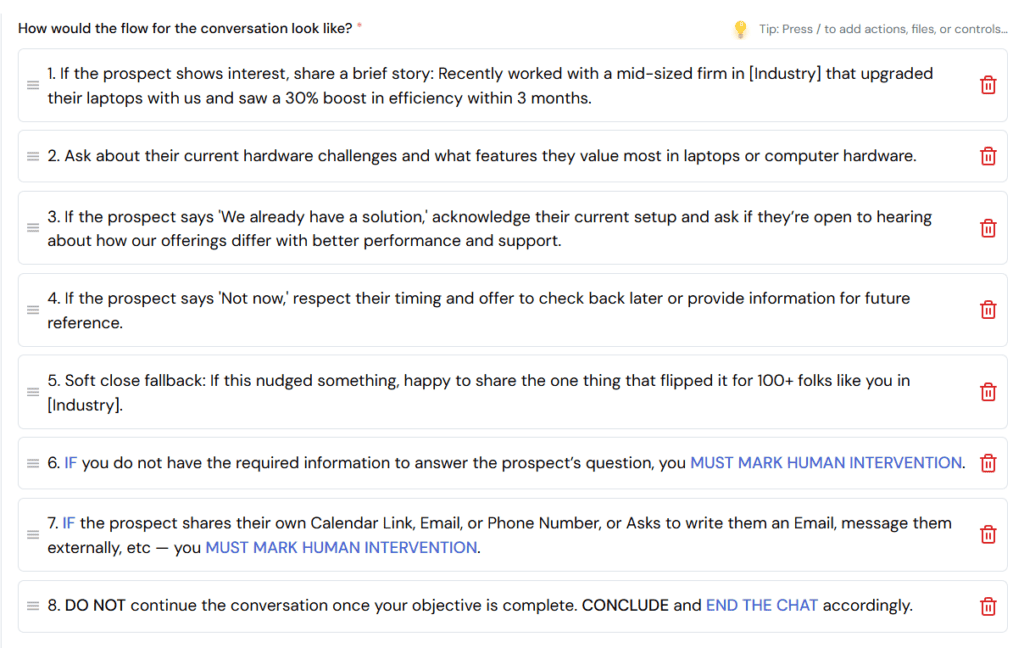
The Chat Flow tab is where you define how Sbl.so handles incoming replies. This is the brain of your campaign — the AI will follow this flow every time a prospect responds.
Campaign Objective
Start with a clear, single-line objective at the top. Keep it short and action-oriented.
Good examples:
“Book a 20-minute call with founders interested in automating their LinkedIn outreach.”
“Qualify leads and direct them to a demo sign-up link.”
“Identify interest in the cohort and collect enrollment form submissions.”
Avoid using transactional words like “sell” or “buy.” Words like “engage,” “identify,” “qualify,” and “pitch” get better results.
The Conversation Flow
Below the objective, you define how the conversation should unfold. Set up intent-based conditions:
If the user shows strong interest → suggest a 20-minute call and share a calendar link
If the user agrees to a meeting → confirm the time and send a confirmation
If the user raises an objection → address it with a specific response
If the user is not ready → offer a softer next step (visit the website, watch a video)
Action Keywords
Use these keywords anywhere in your flow to trigger specific behaviors:
Keyword
What it does
MUST
Forces the AI to perform only that specific action. Use when you want strict control. Example: “MUST appreciate their openness and suggest a call.”
“Double quotes”
Forces the AI to send exactly that phrase, word for word. Example: if someone shows strong interest, must answer: “I would love to show you how this works — here is my calendar link.”
ATTACH
Instructs the AI to attach a specific file or link at that point in the conversation. Files must be pre-uploaded in the Files and Links tab.
SCHEDULE
Schedules a follow-up message for a future date. Example: if the prospect says “reach out next week,” SCHEDULE a follow-up message ACCORDINGLY.
AS VOICE NOTE
Sends the next reply as an audio voice note in your cloned voice. Example: “if the prospect asks what makes us different, answer AS VOICE NOTE.”
END THE CHAT
Closes the conversation cleanly. Use when the prospect has clearly no interest or when all questions have been resolved.
HUMAN INTERVENTION
Flags the conversation for you to step in manually. The AI stops responding and a notification appears on your dashboard. Use when the prospect asks something the AI cannot answer or when a human touch is needed to close the deal.
Testing Your Chat Flow
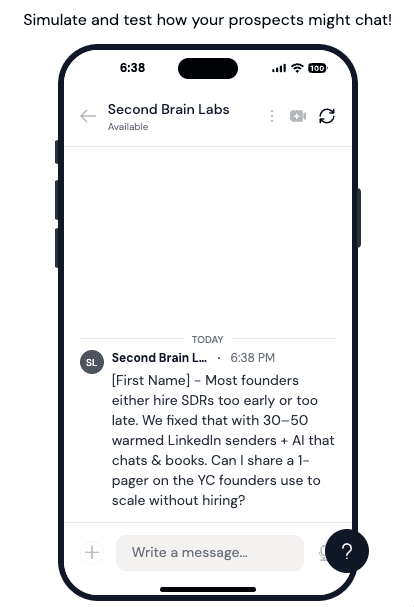
Use the simulation panel on the right side of the Chat Flow tab to test how the AI responds. Type messages as if you are the prospect. If something is not working as expected, go back to the left panel, adjust your instructions, reset the chat, and test again.
Test common scenarios before launching:
Strong interest (“This looks interesting, tell me more”)
A common objection (“We already have a tool for this”)
A pricing question (“How much does this cost?”)
A stall (“Can you follow up with me next month?”)
Step 5 — Smart Follow-ups
Smart Follow-ups are different from the outreach sequence follow-ups. They trigger when a prospect has already replied but then goes idle — they responded once, then stopped engaging.
This is where most deals are lost. Sbl.so’s Smart Follow-ups make sure you never miss a prospect who was warm but went quiet.
How to Set Them Up
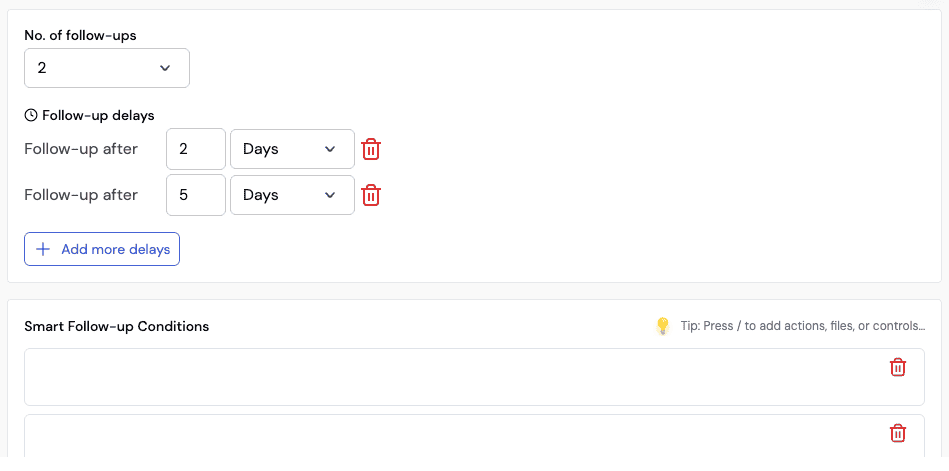
Go to the Chat Flow tab → click Smart Follow-ups
Toggle Smart Follow-ups on
Set the timing for each follow-up. Example: first follow-up after two days of inactivity, second follow-up after five days.
Add reasoning conditions for each follow-up
Writing Smart Follow-up Conditions
This is where the real power is. You give the AI reasoning for each scenario:
“If the prospect has gone idle after showing interest, follow up with a low-pressure question to re-engage.”
“If it is the second follow-up, add a little urgency — highlight what they are missing and ask a simple yes or no question to encourage a quick reply.”
“If the prospect asked about pricing and went quiet, follow up with a specific case study showing ROI.”
The more specific and creative your conditions, the more personalized and effective the follow-ups become. The AI does not send a generic nudge. It crafts a contextual message based on where the conversation left off.
Step 6 – Files and Links Tab
In the Files and Links section of your campaign, you can also pre-load resources to be shared during conversations:
Calendar booking link — so the AI can share it automatically when a prospect agrees to a call
Case studies — so the AI can attach them when someone asks for proof
Product videos or explainers — so the AI can send them in response to specific objections
When adding links, include UTM parameters for tracking. When adding files, give each one a short description so the AI knows when to send it (e.g., “Company Brochure PDF — explaining our offerings and plans”).
Step 6 — Adding Leads
Go to the Add Leads tab. Sbl.so supports multiple ways to add prospects to your campaign. Here is a full breakdown of every method available.
1. Upload CSV
Drag and drop a CSV file containing the LinkedIn profile URLs and names of your prospects. Sbl.so will import them and add them to the campaign. Useful if you have your own list from a CRM, an event, or a manual research project.
2. Sales Navigator (LinkedIn)
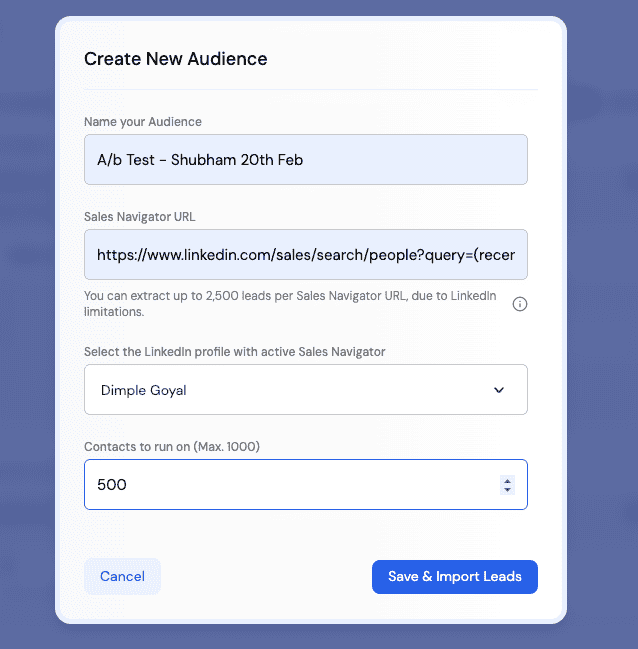
Build your ideal customer search on LinkedIn Sales Navigator, then copy the search URL and paste it into Sbl.so. Set how many leads you want to import and click Save and Import. The platform pulls the profiles directly.
You can create multiple batches from the same search. For example, import 100 leads as batch one, then come back and add 200 more as batch two — Sbl.so remembers the filter and picks up from where it left off.
Watch advanced Sales Navigator strategies used by top performers:
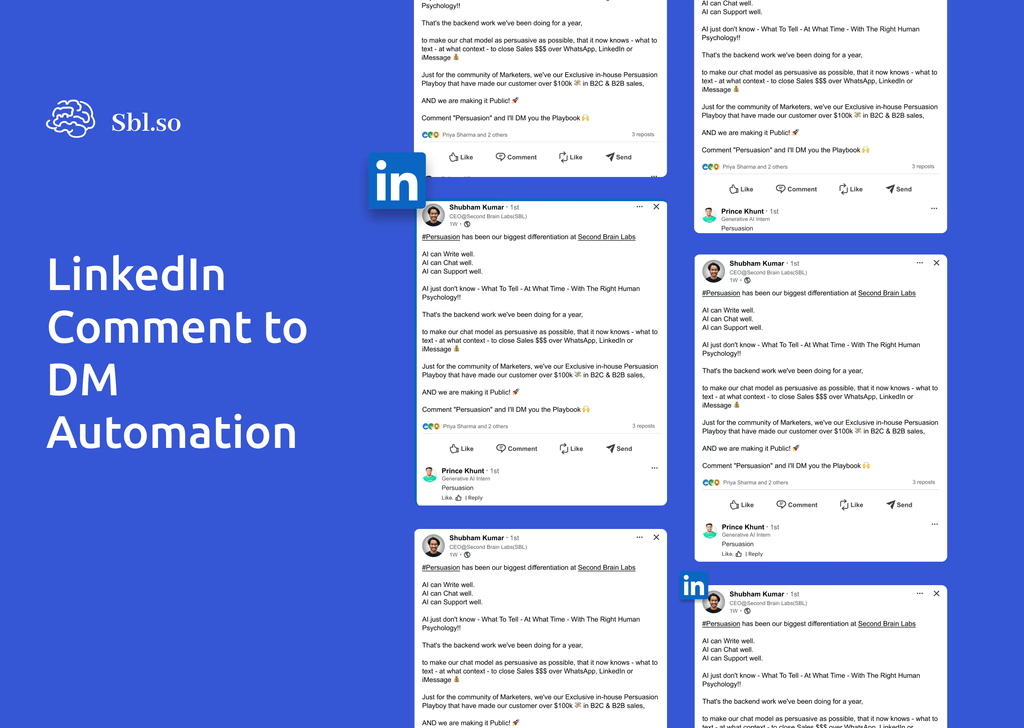
3. Comment to DM (LinkedIn)
Find a LinkedIn post where your ideal prospects are commenting. Copy the post URL and paste it into Sbl.so. Define which comments to target:
All comments — reach everyone who commented
Keyword-based — only reach people whose comments contain specific words
Sentiment-based — only reach people who left a positive comment (Sbl.so does the sentiment analysis automatically)
This is one of the warmest lead sources available. Someone who commented on a post is actively thinking about that topic.
4. Leads via Post Likes (LinkedIn)
Copy the URL of any LinkedIn post and paste it into Sbl.so. The platform extracts everyone who liked that post and adds them to your campaign. This works brilliantly for targeting people engaging with competitor content or posts from thought leaders in your space.
5. Leads by Sbl.so
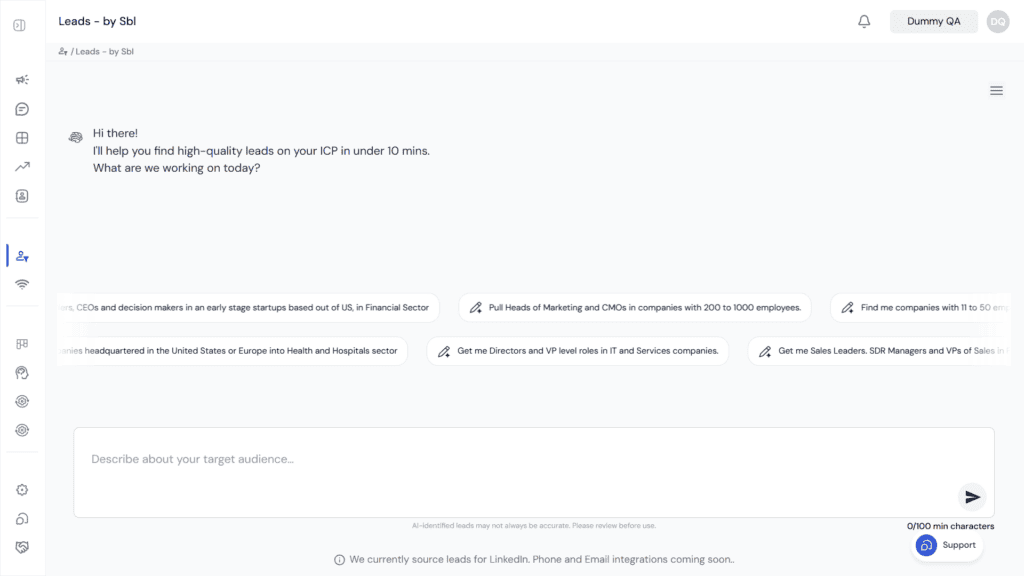
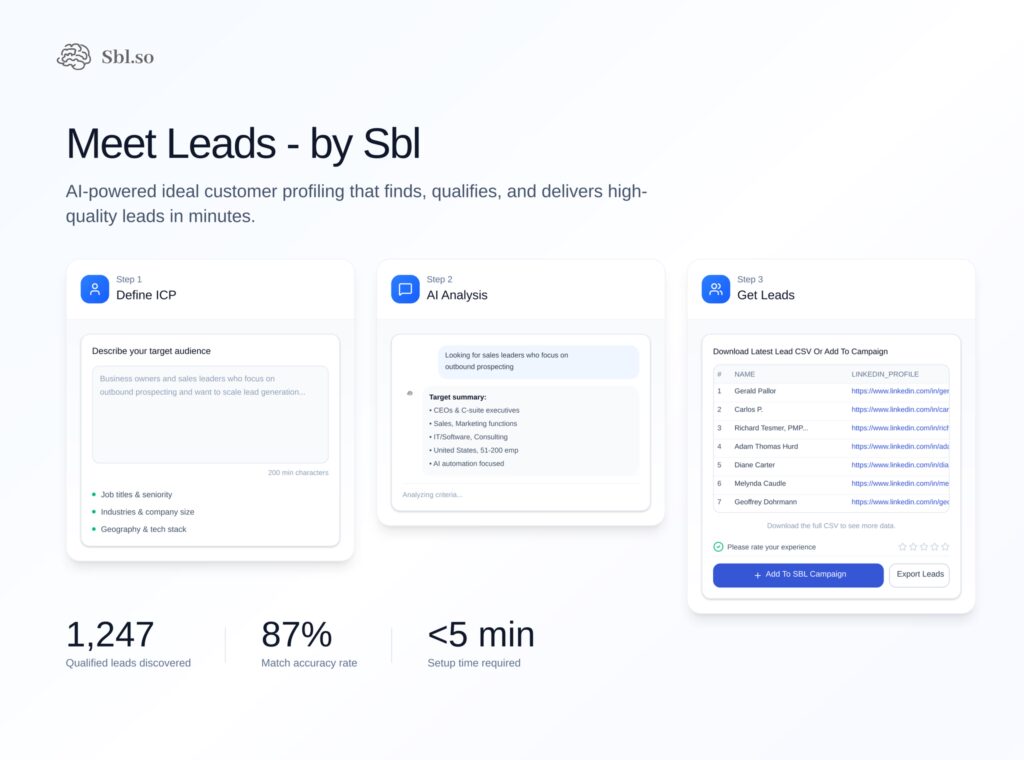
This is the platform’s most powerful lead generation feature. You describe your ideal customer in plain language — a prompt — and Sbl.so finds and extracts qualified leads for you in under ten minutes.
Efficient sales automation platform for generating leads and boosting sales with persuasive techniques.
Example prompt: “I want head of marketing and CMOs in companies with 200 to 1,000 employees, based in the USA and UK.”
After you submit, the system asks clarifying questions to refine the search (title variations, industry focus, funding stage). Once you confirm, click Extract Leads. The platform returns a list of qualified prospects matching your ICP. You can verify individual profiles, request more, and add them directly to your campaign.
6. Manual Entry
Add individual prospects by entering their LinkedIn URL or name manually. Useful for high-value targets you want to add one by one.
7. Existing Campaign Leads
Retarget leads from a previous campaign. You can filter by behavior — people who connected but did not reply, people who showed interest but did not convert, people with a specific objection. This enables precision retargeting with a tailored offer. See Step 10 — Retargeting Campaigns for more on this.
8. Allow Inbound Chats (WhatsApp)
This method allows you to automatically add people to a campaign the moment they message you. It works especially well with WhatsApp, making it ideal for running inbound customer support or building an inbound funnel directly through conversations.
9. Meta Ads Leads (WhatsApp)
This is a WhatsApp-exclusive feature that lets you import leads directly from your Meta ad campaigns. Simply paste your Meta Ad ID, and the campaign will automatically sync with your Click-to-WhatsApp ads. Anyone who clicks your ad and messages your connected WhatsApp number is automatically added to the campaign.
Step 7 — ICP Filter
Once you have added your leads, do not launch yet. Apply the ICP Filter first.
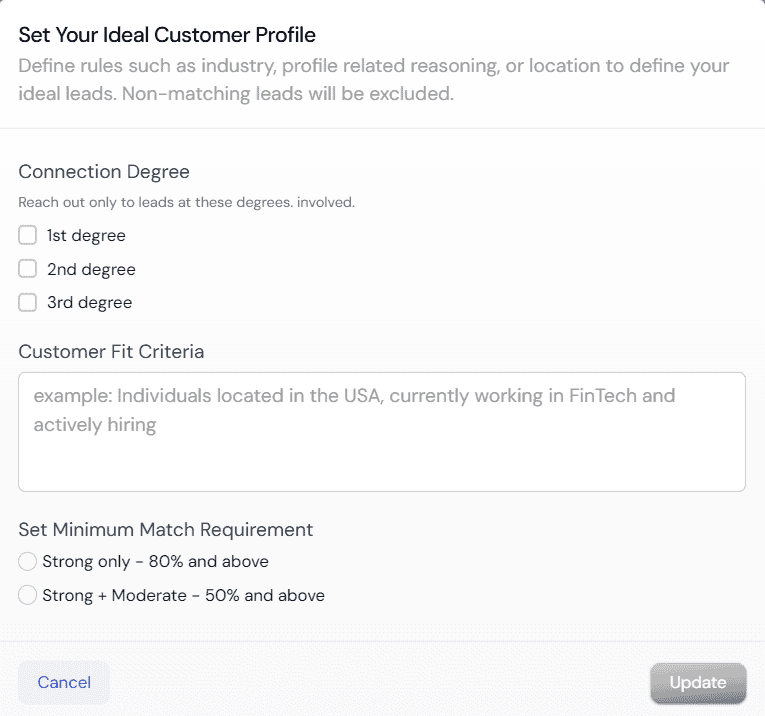
Click ICP Filter in the Leads tab. Enter your scoring criteria — any attribute that defines your ideal prospect. You can score based on:
Location (tier-one country, specific city)
Industry or company type
Job title or seniority level
Follower count or LinkedIn activity level
Years of experience
Education or skills
Profile description keywords
Set a Minimum Match Requirement:
Strong only (80%+) — hyper-precise. Only the best-fit prospects receive your outreach.
Strong + Moderate (50%+) — broader reach, still filtered.
Click Update. From that point, Sbl.so scores every lead you add. Only those who meet your minimum threshold receive a message. Out of thousands of prospects, you might exclude thousands who are not a fit — and that is exactly the point. You are not paying with ad budget. You are paying with your LinkedIn reputation and your time. Every irrelevant message you do not send protects both.
Step 8 — Sources and Knowledge Base
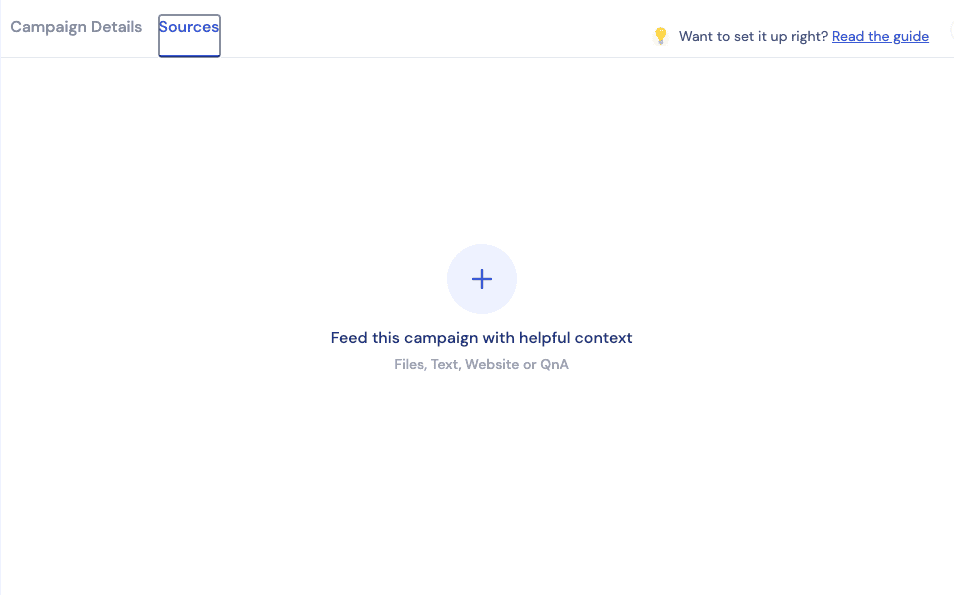
Go to the Sources tab. This is where you make your campaign smarter by feeding it information about your business.
You can add:
Your website or landing page URL — Sbl.so crawls it and uses the information to answer questions and personalize conversations.
Files — PDFs, case studies, one-pagers, pricing documents.
Manually typed content — FAQs, specific objection responses, product details.
Every resource you upload here fine-tunes the AI’s knowledge base for that campaign. If a prospect asks something the AI would otherwise not know, it pulls from what you have provided here instead of guessing or triggering a Human Intervention.
Step 9 — Launching and Reviewing Your Campaign
Launching
Once you are confident in your campaign setup and the simulation is behaving as expected, click Run Campaign → Launch. Your campaign is now live.
Reading Your Campaign Dashboard
After a few days of running, your dashboard will start filling with data. Here is how to read it.
Core Metrics
Metric
What it tells you
Healthy benchmark
Connection Requests Sent
Volume of your outreach
Depends on profiles connected
Acceptance Rate
How compelling your opening is
15–50% depending on targeting method
Reply Rate
How effective your first message is
6–20% depending on campaign type
Conversion Rate
What percentage of conversations reached your objective
10–26% of replied conversations
Sentiment Analysis (Donut Chart)
Segment
Meaning
Target range
Green — Positive Reply
Showing interest, engaging with your message
40–60%
Orange — Objection
Pushing back on price, timing, or fit
10–20% (normal and healthy)
Red — Friction
Feeling bothered or annoyed by the outreach
Under 10%
Yellow — Disengaged
Connected but not replying
Under 35%
Conversion Prediction Gauge
This gauge shows you how your campaign is trending overall. Pointing left means your message or targeting needs work. Pointing right means you are on track — start adding more Fractional SDR profiles to scale.
Requires Human Intervention
Check this section daily. These are your hottest leads. The AI flags conversations where a human needs to step in — typically when a prospect asked something specific, requested a trial, or needs a direct response from a founder. Go in, reply manually, and mark as resolved.
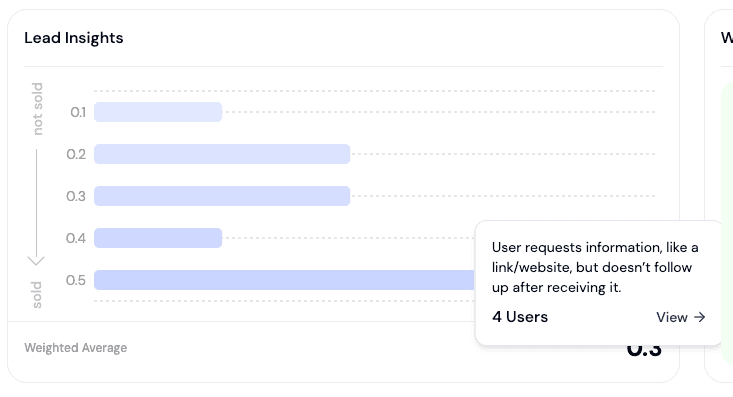
Leads Insight
This section shows you behavioral patterns across your conversations:
What is going well (e.g., “Founder shows interest in case studies”)
What is creating friction (e.g., “Founders express concern about platform cost”)
What common objections are appearing (e.g., “Skeptical about AI claims”)
Use this data to rewrite your chat flow, adjust your follow-up messaging, and design smarter retargeting campaigns.
Fixing What Is Not Working
Acceptance rate is low (under 15%): Your opener is too salesy or your targeting is off. Switch to a community signal or post-reference opener. Tighten your ICP Filter.
P.S. If you’ve read this far, it means you’re serious about success—and we’d love to support you. 🚀
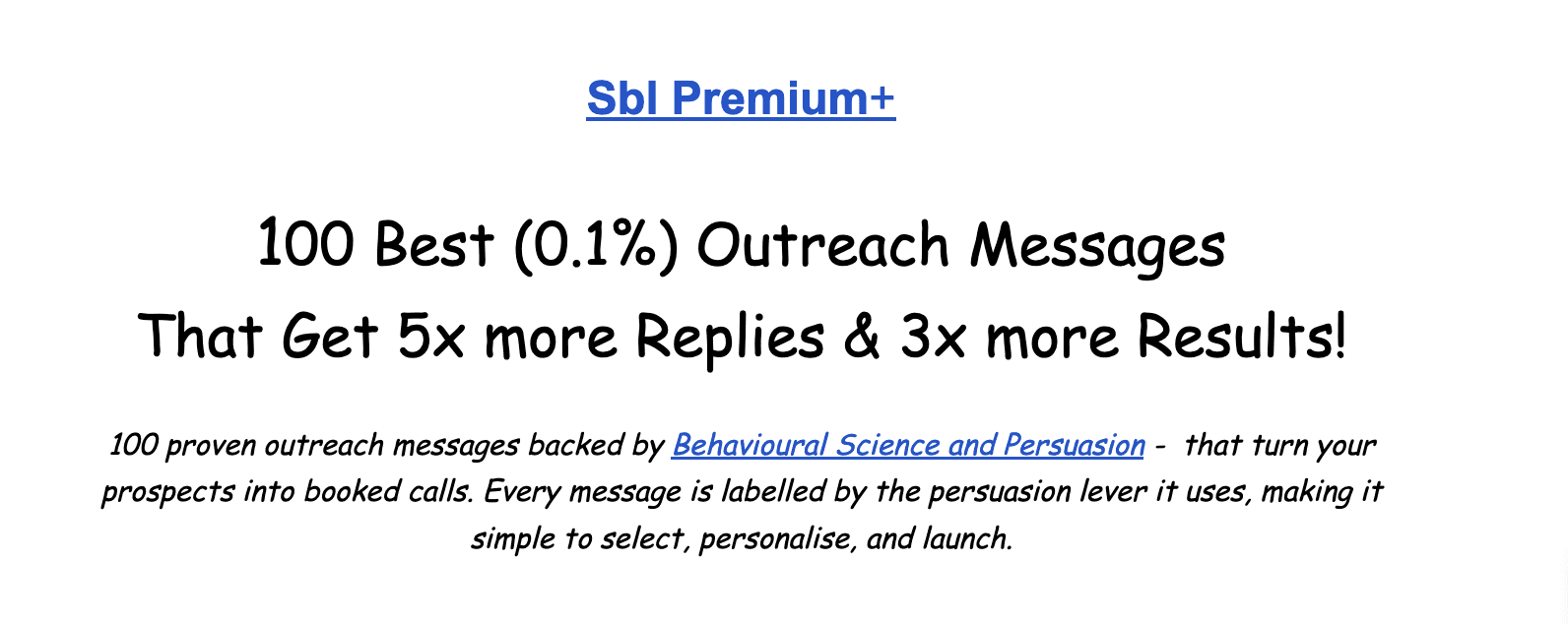
Grab our “Top 100 Outreach Messages” (the best 1%) that consistently drive 5x more replies and 3x better results!
Reply rate is low (under 5%): Your first message after connecting did not land. Cut it to under 250 characters. Remove generic phrases like “we help SaaS teams scale pipeline.” A/B test a different version across two sender profiles.
Friction is high (over 15%): You are reaching the wrong people or opening too aggressively. Remove pitch words from the opener entirely. Do not say “book a call,” “schedule a demo,” or “transform your pipeline” in the first message.
Disengaged rate is high (over 40%): Smart Follow-ups are either not activated or poorly timed. The first follow-up should go out at 24 hours, not two hours. Make sure it adds something new — not a re-pitch of the original message.
Step 10 — Retargeting Campaigns
One of the most underused features in Sbl.so is retargeting — running a second campaign aimed specifically at leads who engaged with your first but did not convert.
Go to Add Leads → Existing Campaign Leads. Select a previous campaign and filter by behavior:
People who had a pricing objection → offer a 30% discount exclusive to them
People who went disengaged after showing interest → re-engage with a different angle
People who asked for more information → send a case study or a short video
People who were not ready → follow up after 30 days with a new hook
This is where your Leads Insight data becomes directly actionable. If your dashboard tells you that 71 prospects expressed concern about platform cost, create a retargeting campaign specifically for them — with a discount offer, an ROI calculator, or a comparison against what they are currently doing manually.
Retargeting campaigns are almost always higher converting than cold campaigns because the trust barrier is already partially removed. These people engaged with you before. They just needed something different to push them over the line.
Key Tips for Writing Great Campaign Flows
Write in second person. Address the AI directly as “you.” Say “ask the prospect where they are in their journey” not “the AI should ask where the prospect is.” It processes direct instructions better.
Capitalize action words. ATTACH, SHARE, ASK, PITCH, THANK, SCHEDULE. This helps the AI prioritize key actions within your flow.
Use quotation marks for exact phrasing. When you want the AI to say something word for word, put it in double quotes. Without quotes, the AI uses its intelligence to rephrase based on the reasoning you gave.
Keep your flow to 6–8 key steps. Do not try to cover every possible scenario in the flow. Use your Sources and Knowledge Base to handle edge cases.
Never pitch in step one of the chat flow. The sequence is always: engage first, identify the need, then pitch. Cold pitching in the opening message kills conversion.
Test before you launch. Run the simulation through at least five scenarios. If anything feels off, fix the instruction — do not launch and hope for the best.
Iterate every two weeks. Review your sentiment data and update your chat flow based on the objections and patterns showing up most. Campaigns that get reviewed and improved regularly outperform set-and-forget campaigns by 3–5x.
Industry Playbooks
The sections below are built from real campaign data across 320,000+ delivered messages and 1,200+ campaigns. Each playbook covers the specific campaign types, targeting strategy, setup patterns, benchmarks, and troubleshooting for that industry.
Sbl.so ran 285,000+ AI conversations in 2025 and added $5M in pipeline for our clients. Here’s the exact LinkedIn playbook behind those numbers — revealed for free.
Playbook 1: B2B SaaS & Tech Founders
Who this is for: SaaS founders, growth leads, sales ops teams, and anyone selling B2B software. Your typical target is other founders, VP Sales, RevOps leads, or C-suite buyers at companies with 1–500 employees.
Data: 211,000 delivered messages · 529 campaigns
The Core Challenge in This Vertical
SaaS founders are the most messaged people on LinkedIn. They receive 10–15 outreach messages per week. Generic pitches about “scaling pipeline” or “booking more demos” all look identical to them. The delete rate is brutal.
The fix is not better copy. It is better targeting signal.
Targeting Approach
Connection Acceptance
Hot Lead Rate
Generic cold list
9–13%
2.8%
Community signal
44–51%
5–7%
Post engagement
30–44%
6–9 per 100
A mediocre message sent to someone who showed a behavioral signal beats excellent copy sent to a cold list — every single time.
Campaign 1: Community Signal Outreach
What it is: Target members of communities your ICP belongs to (RepGenius, SaaSRise, YC Alumni, etc.) and reference that community in your connection request. The shared context makes your message feel like a peer reaching out, not a vendor pitching.
Result: 44–51% connection acceptance vs 9–13% for generic cold outreach to the same ICP.
How to find these leads:
Search the community name on LinkedIn → Click People → collect profile URLs → upload as CSV to Sbl.so
Use Sales Navigator keyword search: "RevGenius" OR "SaaSRise" OR "YC W24" → stack title and company size filters → copy URL → paste into Sbl.so Sources → Sales Navigator
Setup pattern:
Use your own LinkedIn profile as primary sender — community reference only lands if you are a real member
Outreach message: soft nudge referencing the community — no pitch. The goal is the connection, not the sale.
After they connect, the AI introduces what you do via voice note (toggle “Send as voice note” ON)
Chat Flow: ENGAGE → IDENTIFY their current outreach situation → PITCH your solution
Smart Follow-ups: 1–2 follow-ups max. Warm check-in, not a re-pitch.
Metric
Benchmark
Connection acceptance
35–51%
Reply rate
8–15%
Hot leads per 100 delivered
4–7
Avg conversation depth
3–5 messages
Campaign 2: Post Engagement Targeting
What it is: Target people who recently liked or commented on a specific LinkedIn post relevant to your ICP. Reference that post in your opener. The prospect already signaled interest in the topic — you are following up on something they did publicly, not interrupting them cold.
Best posts to target for B2B SaaS:
Posts by SaaS CEOs on AI doing sales work
Viral posts about signal-based prospecting or replacing SDRs
Posts from your competitors with high engagement
Any SaaS exec post on scaling without headcount
Setup options:
Sbl.so → Sources → Leads via Post Likes → paste the post URL
Sbl.so → Sources → Comment to DM → paste the post URL → Sbl.so automatically DMs everyone who comments. Comment-to-DM converts at 15–25% — the highest of any lead source in our data.
Setup pattern:
Outreach message: reference the specific post they engaged with. Create curiosity, do not over-pitch.
Follow-ups: 2–3 as voice notes, each adding a new angle (social proof, use case, final ping)
Chat Flow: ENGAGE referencing the post → IDENTIFY their situation → PITCH → give two routes: DIY trial or guided setup call
Metric
Benchmark
Connection acceptance
30–44%
Reply rate
12–20%
Positive sentiment
65–75%
Hot leads per 100 delivered
6–9
Comment-to-DM conversion
15–25%
Campaign 3: Sales Navigator + ICP Filter
What it is: Build a precise ICP in Sales Navigator, import those leads into Sbl.so, run the ICP Filter, then launch. Highest volume campaign — but volume controlled by precision.
Sales Navigator search to start with:
Job Title: Founder OR Co-Founder OR CEO OR “VP Sales” OR “Head of Sales” OR RevOps OR CRO
Company size: 11–50 OR 51–200
Industry: Computer Software OR Internet OR SaaS
Geography: Your target market
Activity: Posted on LinkedIn in the last 30 days (critical — active profiles only)
ICP Filter settings: Strong only (80%+) for precision. Strong + Moderate (50%+) for volume.
Scaling lever: Add 5–10 Fractional SDR profiles. Sbl.so auto-rotates between them. Ten profiles = 2,000 connection requests per week.
A/B testing: Run 2–3 message variations simultaneously across different SDR profiles. After 200 delivers per version, kill the underperformers and scale the winner.
Metric
Benchmark
Connection acceptance
13–20%
Reply rate
6–10%
Hot leads per 100 delivered
2–4
Volume (10 profiles)
2,000 connection requests/week
Best practice: run all three campaign types in parallel. Signal-based campaigns (1 and 2) for quality. Sales Navigator campaigns (3) for volume. The two pipelines feed each other.
Playbook 2: Edtech & Coaching
Who this is for: Course creators, cohort founders, bootcamp operators, coaching businesses, and anyone selling educational programs or expert-led services.
Data: 35,000 delivered messages · 65 campaigns
Why Edtech Is Different
Edtech and coaching is the highest connection acceptance vertical in the entire dataset — 53.4% across 65 campaigns. Educational audiences are on LinkedIn to grow. They are already in a growth mindset. They are not getting 15 outreach messages per week. They respond.
But high acceptance does not automatically mean high conversion. People are warm to connecting, but they need the right conversation to convert. You are not selling a software demo. You are selling transformation — a career outcome, a skill, a result. The conversation needs to be curiosity-first, not pitch-first.
Targeting Approach
Connection Acceptance
AI Convo Rate
Generic cold list
18–25%
Low
Warm audience (webinar signups, existing leads)
53%+
Very high
Post engagement / signal-based
40–50%+
High
Campaign 1: Warm Audience Outreach
What it is: Reach people who already have a relationship with your brand — webinar attendees, waitlist signups, past students, or people who downloaded a lead magnet. These are your highest-converting leads because trust is already partially built.
Best lists to start with:
Webinar registrants who did not attend
Webinar attendees who did not buy
Waitlist signups for an upcoming cohort
Past students for re-engagement or upsell
People who filled a lead magnet form
A webinar registrant who did not buy is 10x easier to convert than a cold prospect. Always start with your existing audience before going cold.
Setup pattern:
Persona: use your own profile or one that feels like a mentor, not a salesperson
Outreach message: reference why you are reaching out specifically — personalize to the action they took. Ask a question about where they are in their journey, do not pitch immediately.
Chat Flow: ENGAGE by acknowledging the action they took → IDENTIFY their specific challenge → PITCH your program as the path to their desired outcome → OFFER a next step (call, free session, or enrollment link)
Smart Follow-ups: 2–3 follow-ups. Each one should offer something new — a student success story, a free resource, a cohort deadline reminder.
WhatsApp: For warm audiences already in your ecosystem, run WhatsApp campaigns alongside LinkedIn. No monthly outreach limit. Voice notes and short messages work best.
Metric
Benchmark
Connection acceptance
50–70%
Reply rate
15–25%
Hot leads per 100 delivered
8–15
Campaign 2: Post Engagement and Community Signal
What it is: Target people who recently liked or commented on content about career growth, skill-building, or industry transitions. For edtech, this is exceptionally effective because learner ICPs leave public signals everywhere — liked posts about “how I got into AI/ML,” comments on “breaking into product management,” engagement with posts about the skills gap.
Best posts to target for edtech:
Posts about career transitions into your course topic
Posts about upskilling, certifications, or the skills gap
Posts from thought leaders in your space with high engagement
Posts from companies hiring in the skill area your course covers
Community signal: Find LinkedIn alumni networks, professional associations, or career development groups where your learner ICP gathers. Reference the community in your opener.
Setup pattern:
Outreach message: reference the specific post or community. Lead with curiosity, not the course.
Follow-ups: voice notes perform better than text in educational conversations
Chat Flow: ENGAGE → IDENTIFY their current role and what they are trying to achieve → PITCH your program as the bridge → OFFER a free resource or webinar as the next step for cold audiences
Metric
Benchmark
Connection acceptance
40–53%
Reply rate
12–20%
Positive sentiment
70–87%
Hot leads per 100 delivered
6–10
Campaign 3: Sales Navigator (Cold at Scale)
Sales Navigator search for edtech:
Job Title: [The role your course serves — current title the learner holds]
Seniority: Entry OR Associate OR Mid-Senior
Years in role: 1–5 years (sweet spot for upskilling intent)
Activity: Posted on LinkedIn in the last 30 days
Edtech searches are different from SaaS. You are targeting by career stage, not company size. Someone two years into their current job is far more likely to be thinking about upskilling than someone ten years in.
For cold audiences, offer a lower-friction next step first: a webinar, a free resource, or a discovery call — not direct enrollment. Use your best cold campaign as a top-of-funnel for a webinar, then run a warm retargeting campaign to webinar attendees who did not enroll.
Metric
Benchmark
Connection acceptance
20–35%
Reply rate
8–15%
Hot leads per 100 delivered
3–6
Volume (10 profiles)
2,000 connection requests/week
Playbook 3: Agencies & Lead Gen Teams
Who this is for: Digital marketing agencies, lead generation agencies, outbound sales agencies, and any team running LinkedIn outreach on behalf of clients.
Data: 42,000+ delivered messages · 496 campaigns
Why Agencies Have the Highest Hot Lead Rate of Any Vertical
Agencies are operationally aware buyers. They understand outreach. They know what good looks like. When you reach them with the right message about scale and safety, they move fast.
Metric
Agencies / Lead Gen
SaaS Average
Hot lead rate
37.9%
2.8%
Connection acceptance
21.9%
18.9%
The core story for this vertical is not features. It is operations.
Agency buyers care about: running 10 client campaigns simultaneously without accounts getting flagged, keeping client conversations separated and organized, scaling outreach volume without hiring more people, and white-labeling the infrastructure so it looks like their own system.
Note for agencies using Sbl.so for clients: Sbl.so supports white-labeling. You can run the entire infrastructure under your brand. Your clients see your system, not Sbl.so’s. Use multi-profile rotation to assign different Fractional SDR profiles to different clients so outreach never overlaps. The Unified Inbox lets you manage all client conversations from one place.
Campaign 1: Competitor and Signal-Based Outreach
What it is: Target people who are engaging with content about outreach tools, lead gen strategies, or the exact problems your agency solves. They are already thinking about scaling outreach — you are stepping into a conversation they started.
How to find these leads:
Find posts from competing LinkedIn automation tools (Dripify, HeyReach, Expandi, Apollo) or competing agencies with high engagement → use Sbl.so’s Post Likes or Comment to DM on those posts
Target posts about outbound strategy, SDR scaling, lead gen, or sales operations via Comment to DM
Find LinkedIn communities where agency owners and sales leaders gather → search community name → People → export → upload as CSV
Setup pattern:
Persona: your own profile or a senior team member — agency buyers respond to founder-to-founder openers
Message: speak to the operational problem — account limits, ban risk, multi-client management — not features. Lead with the constraint they are feeling.
Chat Flow: ENGAGE by acknowledging the operational challenge → IDENTIFY their current setup and scale → PITCH your infrastructure as the solution → OFFER a live demo
Metric
Benchmark
Connection acceptance
25–40%
Reply rate
12–20%
Hot leads per 100 delivered
8–15
Avg conversation depth
4–6 messages
Campaign 2: Direct Outreach to Agency Owners and Sales Leaders
Sales Navigator search for agencies:
Job Title: “Agency Owner” OR “Founder” OR “Head of Growth” OR “VP Sales” OR “Sales Operations”
Keywords: “lead generation” OR “outbound” OR “growth agency” OR “marketing agency”
Company size: 2–50 (most agencies are small)
Activity: Posted on LinkedIn in the last 30 days
A/B test three angles:
Version A: Account safety angle (how we prevent bans and protect client profiles)
Version B: Multi-client scale (how we manage 10 client campaigns from one dashboard)
Version C: White-label angle (how it looks like your system to your clients)
After 200 delivers per version, kill the underperformers and scale the winner.
Metric
Benchmark
Connection acceptance
18–25%
Reply rate
8–15%
Hot leads per 100 delivered
6–10
Volume (10 profiles)
2,000 connection requests/week
Campaign 3: Retargeting Warm Leads and Existing Contacts
What it is: Re-engage people who showed interest in previous campaigns but did not convert. For agencies, this also includes retargeting your own existing client list with expanded services or new capabilities.
Who to retarget:
Leads who connected but did not book a call → re-approach with a new case study or specific insight
Leads who asked about pricing and went quiet → offer a free audit or platform walkthrough
Existing clients → new feature announcement or expansion capacity offer
Key rule for retargeting: Do not re-pitch. Reference the previous conversation or a new development. Keep it short and personal. These contacts already know you — over-following up kills goodwill.
Metric
Benchmark
Re-engagement rate
15–25%
Hot lead rate
10–18%
Conversion to call
8–15%
Time to convert
3–7 days
Dashboard note for agencies: A high objection rate (15–20%) in this vertical is not necessarily bad. Agency buyers push back as part of their evaluation process. Watch for objection rate plus disengaged rate together — that combination signals a message or targeting problem. High objection rate with high conversation depth usually means the AI is handling it well.
Playbook 4: Recruiters & HR Teams
Who this is for: Recruitment agencies, in-house talent teams, HR consultancies, and hiring platforms running outreach on both sides of the hiring market.
Data: 32,000+ delivered messages · 113 campaigns
The Two-Sided Outreach Problem
Recruitment is the only vertical where you are running outreach in two directions at once — toward candidates who fit open roles, and toward hiring managers or companies who need talent. Most recruiters treat LinkedIn outreach as a single motion. The teams that win treat it as two separate systems running in parallel.
Target Audience
Connection Acceptance
Hot Lead Rate
Candidate outreach
53%+
High volume
Hiring manager outreach
28.7%
High intent
Critical rule: Set up completely separate campaigns for candidates and hiring managers. Different personas, different messages, different chat flows, different objectives. Never mix them in the same campaign.
Campaign 1: Candidate Outreach
What it is: Identify candidates who fit an open role and reach out via LinkedIn. Best candidate campaigns are signal-driven — targeting people who are actively showing career-related behavior.
How to find candidates:
Post engagement: find posts about career transitions, job searching, or skill development in your niche → use Post Likes or Comment to DM
Community and alumni signal: find LinkedIn communities and alumni networks where your target candidates gather
Sales Navigator: search by current job title, seniority, and years in role (2–5 years is the sweet spot for openness to new opportunities)
Your ATS or CRM database: export past candidates and upload as CSV — warmest audience you have
WhatsApp: for warm candidates in your ecosystem, voice notes and short messages convert exceptionally well
Setup pattern:
Persona: feels like a trusted career advisor — warm, knowledgeable about the candidate’s field. Not a recruiter running a blast.
Outreach message: express genuine interest in their career goals, not just whether they are open to a job. Reference their current role or a signal they showed. Under 250 characters.
Chat Flow: ENGAGE by acknowledging their background → IDENTIFY their career goals and current situation → QUALIFY for the specific role → HUMAN INTERVENTION when qualified (hand off to a human recruiter)
Smart Follow-ups: 2–3 follow-ups. Warm check-in first. Specific opportunity or resource second. Final gentle nudge third.
Metric
Benchmark
Connection acceptance
50–65%
Reply rate
15–25%
Qualified candidates per 100 delivered
8–15
Avg conversation depth
4–7 messages
Campaign 2: Hiring Manager and Company Outreach
What it is: Reach decision-makers at companies who need talent — HR leaders, hiring managers, department heads, founders — and position your recruitment capability as the solution to their hiring problem.
How to find hiring managers:
Job posting signal: find decision-makers at companies that have recently posted roles your candidates fill → target those people specifically
Post engagement: reach hiring managers who liked content about talent acquisition challenges, scaling teams, or hiring difficulties
Sales Navigator: search for HR leaders, VPs of Engineering, or department heads at companies of relevant size and industry
Setup pattern:
Persona: business partner tone — direct, credible, operationally aware
Outreach message: lead with the specific talent problem you solve. Do not lead with your agency credentials. Reference a specific hiring signal if you have one (e.g., “I saw you posted a role for a Senior Product Manager recently”).
Chat Flow: ENGAGE by referencing the hiring signal → IDENTIFY the specific role or team they are filling → PITCH your placement capability → OFFER a call to discuss candidates you have available
Smart Follow-ups: interest-based first, timing-aware second that acknowledges they are likely deep in a hiring cycle
Metric
Benchmark
Connection acceptance
22–35%
Reply rate
10–18%
Hot leads per 100 delivered
8–12
Avg conversation depth
3–5 messages
Campaign 3: Retargeting and Re-Engagement
What it is: Re-engage warm contacts from both sides of the market. Hiring needs change. A hiring manager who was not hiring three months ago may have opened five new roles. A candidate who was not ready to move may be actively looking now. Timing is everything in recruitment — retargeting catches people when their situation has changed.
Who to retarget:
Candidates who were in your pipeline but did not place → reach out with a new relevant role
Candidates who went quiet after showing interest → check in with a market update or specific opportunity
Hiring managers you spoke to previously → follow up with a new placement result or market insight
Best channel for candidate re-engagement: WhatsApp. Voice notes and short conversational messages perform far better than LinkedIn DMs for warm recruitment conversations.
Metric
Benchmark
Re-engagement rate
20–35%
Hot lead rate
12–20%
Conversion to placement discussion
10–18%
Time to re-engage
3–7 days
Dashboard note for recruiters: Track metrics separately for candidate campaigns and hiring manager campaigns. They will behave very differently. For candidate campaigns, expect 50–65% positive sentiment. For hiring manager campaigns, expect 35–50% — but the intent behind each positive reply is much higher. Check “Requires Human Intervention” daily in both campaign types. In recruitment, human handoff is not optional — it is the critical step that closes the loop.
Scaling Across All Verticals
Once you find a campaign version that is working, here is the exact process to scale it:
After 200–300 delivers, confirm your winning version
Kill the underperforming versions
Add more Fractional SDR profiles to the winning campaign
Duplicate the winning campaign → adjust the opener slightly → run as a new variation
Every two weeks: review sentiment distribution, update your chat flow based on the objections showing up most, and adjust your Smart Follow-up conditions
Use your Leads Insight data to design your next retargeting campaign — always be running at least one retargeting campaign alongside your main outreach
Questions? Join the Sbl.so Slack community, reach out via WhatsApp, or book a call with the team. We are here to help you get results.

 ChatGPT