
If you’ve ever wanted an AI that doesn’t just draft your LinkedIn outreach but actually runs the campaign — building the ICP, launching sequences, triaging replies, and reporting back on what worked — that’s what SBL MCP Stack is for. It’s not “just an MCP.” It’s a full AI campaign manager for sbl.so that lives inside Claude, built on playbook data from 320,000+ delivered messages across 1,200+ campaigns.
The good news for developers: you don’t need to know what MCP even is to use it. If you do know, you get raw programmatic access to 30+ tools and a hosted Streamable HTTP endpoint you can wire into Claude Code, Codex, n8n, or your own agent. Either way, this guide walks you through the full setup, end to end, plus what to do once it’s installed.
Everything below is sourced directly from the sbl-stack GitHub repo and its release notes, current as of v0.2.4 (“high-intent outreach”).
What you’re installing
SBL Stack ships as two pieces, and you can install one or both:
| Layer | What it is | Required? |
|---|---|---|
| sbl-mcp | The tools layer — 30 MCP tools that let Claude talk directly to your sbl.so account | Yes |
| sbl-stack (this repo) | The orchestration/skill layer — turns raw tools into guided flows like /sbl-create and /sbl-triage | Optional, but recommended |
sbl-mcp works standalone if you just want Claude to have raw tool access. Add the skill layer on top if you want the guided, conversational workflow (recommended for most people, especially non-developers).
⭐ Star / browse the repo and see all releases before you install, so you know what’s shipped in each version.
Option A — Claude Desktop (recommended, no terminal)
This is the path for most users, including non-developers. It requires no Python, no Node, and no CLI.
Step 1: Create your API key
Go to app.secondbrainlabs.com/mcp-server and create a new API key.
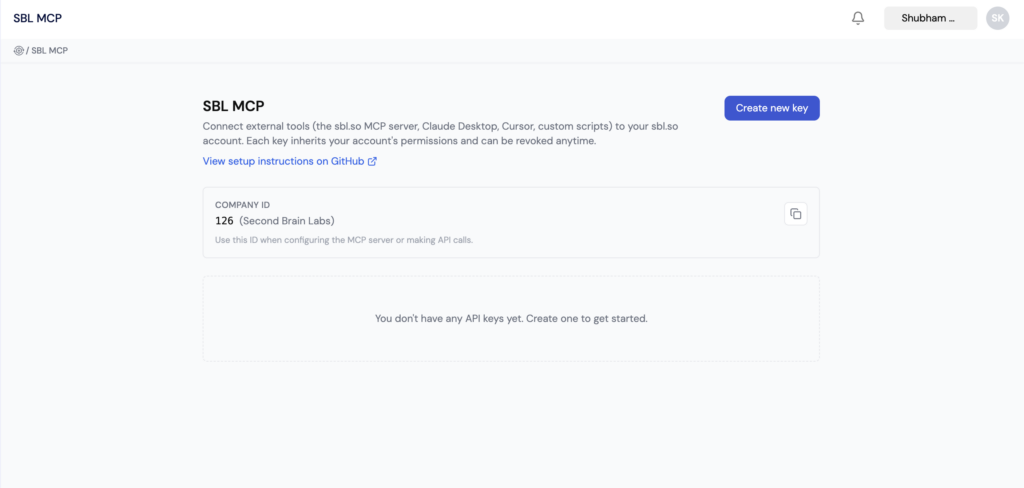
Treat this key like a password: keep it out of chat messages, screenshots, logs, and plaintext docs. You’ll paste it once, directly into the extension’s config field — never into a Claude conversation.
If you’re on the LinkedIn-outreach flow, also connect your LinkedIn sender at app.secondbrainlabs.com/settings?tab=communication so sbl_list_linkedin_channels has something to find.
Step 2: Download the MCP bundle
Head to the latest sbl-stack release (currently v0.2.4 — “high-intent outreach”) and grab the bundle from Assets:
sbl-mcp-0.2.4.mcpb— the current format, use this unless told otherwisesbl-mcp-0.2.4.dxt— a byte-identical file, only needed if your Claude Desktop build still expects the legacy.dxtfilename
⬇️ Download the latest release directly
Step 3: Install the extension
- Open Claude Desktop → Settings → Extensions → Advanced settings → Install Extension.
- Select the
.mcpbfile you just downloaded. - Double-click it if you downloaded it straight into your Downloads folder — Claude Desktop will pop up an install dialog on its own.
- When prompted, paste in the API key from Step 1 (required). Leave the API URL field on its default (
https://api.sbl.so) unless your account runs on a non-production environment. - Click Install, then make sure the connector is toggled Enabled.
Don’t have Claude Desktop yet? Download it here — it’s free to start.
That’s it for raw tools. Open a new chat and ask Claude to “list my campaigns” — if it comes back with a table, you’re connected. v0.2.4 exposes exactly 30 tools, unchanged from v0.2.3 (this release only added a new prompt — more on that below).
Step 4 (recommended): Add the orchestration skill
The MCP bundle gives Claude the tools, but the skill layer is what turns them into guided flows like /sbl-create and /sbl-triage.
- On the repo page, click Code → Download ZIP.
- In Claude Desktop, go to Settings → Skills (or your version’s skill upload UI) → Upload skill → select the ZIP you just downloaded.
- In any chat, invoke the skill — via the skill picker, the
+menu, or just typinguse the sbl skill.
Once loaded, just type /sbl and don’t type anything else on that first message — Claude will load the skill, ask for what it needs (starting with your company ID, see below), and take it from there.
Step 5: Save your company ID
The first time you run a flow, Claude will ask for your sbl.so company ID (find it under sbl.so → Settings → Company, or ask the SBL team if it’s not visible yet on your account). To skip that prompt every time, add this to your terminal profile (e.g. ~/.zshrc on Mac):
export SBL_COMPANY_ID=<your-company-id>
Then reload with source ~/.zshrc.
Option B — Remote MCP URL (beta): Claude Code, Codex, n8n, or your own agent
If you’re building on top of sbl.so rather than just chatting with it, skip the local bundle entirely and point your client at the hosted endpoint: https://mcp.sbl.so/mcp. Create or revoke your bearer key at the same place as before: app.secondbrainlabs.com/mcp-server. Never hardcode the key in chat or commit it to a config file — always source it from an environment variable or secret manager.
Claude Code
claude mcp add --scope user --transport http sbl https://mcp.sbl.so/mcp \
  --header 'Authorization: Bearer ${SBL_API_KEY}'
Keep the literal ${SBL_API_KEY} reference in the command — set the actual value in the environment that starts Claude Code. Restart Claude Code and confirm you see exactly 30 sbl_* tools. To also get the /sbl orchestration skills:
git clone https://github.com/SecondBrainLabs-SBL/sbl-stack && cd sbl-stack && ./setup
Codex CLI
[mcp_servers.sbl]
url = "https://mcp.sbl.so/mcp"
bearer_token_env_var = "SBL_MCP_KEY"
Note bearer_token_env_var takes the name of the environment variable, not the key itself. Put the actual value in whatever environment or secret manager starts Codex, then restart.
n8n
Add an MCP Client Tool node → endpoint https://mcp.sbl.so/mcp → transport HTTP Streamable. Source the bearer token from an n8n credential or secret expression rather than typing it directly into the workflow.
Anthropic API / your own agent
Configure a URL-type MCP server pointed at https://mcp.sbl.so/mcp and load the authorization token from your application’s secret manager at request time.
Note: claude.ai’s web custom connectors require OAuth and aren’t compatible with this bearer-key endpoint. For a web-based Claude experience, use the Claude Desktop MCP bundle instead (Option A).
What a first run actually looks like
Once installed, this is the whole interaction:
You:    /sbl

Claude: Checking your campaigns...

        YOUR CAMPAIGNS
        ┌──────────────────────┬────────┬─────────┬───────────┬───────┐
        │ Name                 │ ID     │ Status  │ Channel   │ Score │
        ├──────────────────────┼────────┼─────────┼───────────┼───────┤
        │ Demo Booking - SaaS  │ 1367   │ DRAFT   │ LinkedIn  │ 64    │
        │ Chrome Enterprise    │ 1346   │ RUNNING │ LinkedIn  │ —     │
        └──────────────────────┴────────┴─────────┴───────────┴───────┘

        ⚠️ 1 draft has a score of 64/100 — 2 gaps to fix.

        What do you want to do?
        A) Create a new campaign
        B) Fix the draft (campaign 1367)
        C) Triage today's HI queue
Pick a letter and Claude drives the rest — asking clarifying questions, drafting copy, and stopping at every point that requires your explicit sign-off (more on that below).
The full command set once the skill is loaded:
| Command | What it does |
|---|---|
/sbl | Home screen — see all campaigns, surface what needs attention |
/sbl-create | Answer 8 questions → get a full campaign built by AI |
/sbl-optimize | Score a draft, identify gaps, rewrite copy |
/sbl-triage | See who needs a reply today, read the thread, send with one click |
/sbl-playbook | Get the right strategy for your vertical and ICP |
/sbl-retro | Weekly report — what’s working, what’s not, what to change |
The 30 tools, grouped by what you’d use them for
If you’re building against the raw MCP layer rather than the skill, here’s the full catalog.
Campaigns — read & inspect sbl_list_campaigns, sbl_get_campaign, sbl_get_campaign_analytics, sbl_list_campaign_users, sbl_get_conversation, sbl_list_linkedin_channels
Campaigns — create & edit sbl_create_campaign_from_prompt, sbl_update_campaign_component, sbl_create_retargeting_campaign, sbl_bind_linkedin_channel
Campaign lifecycle sbl_run_campaign, sbl_end_campaign
Messaging & human intervention sbl_send_campaign_message, sbl_list_human_intervention, sbl_reply_and_resolve, sbl_resolve_human_intervention, sbl_add_user_to_campaign
Leads — CSV import sbl_upload_campaign_leads_csv (up to 20MB), sbl_start_csv_lead_import, sbl_get_csv_lead_import_status
Leads — LinkedIn Sales Navigator sbl_start_sales_navigator_lead_import, sbl_get_sales_navigator_lead_import_status
Leads — post engagement (new focus in v0.2.4) sbl_preview_post_engagement, sbl_import_post_engagement_leads, sbl_get_post_engagement_lead_import_status, sbl_configure_post_engagement
Leads — AI prompt (native ICP) sbl_create_prompt_lead_session, sbl_refine_prompt_lead_session (up to 2 refinements), sbl_get_prompt_lead_session, sbl_approve_prompt_lead_sample (billable; default 10, max 100 leads)
Design principle: nothing launches, sends, or bills without an explicit approval step. Drafts stay drafts until you tell it to go — a sbl_run_campaign call still requires your sign-off, sbl_approve_prompt_lead_sample is the one action that’s billable, and sender binding uses revision-based compare-and-set so a stale draft can’t silently launch under a different sender than you approved.
What’s new in v0.2.4: high-intent outreach
The latest release adds a second packaged prompt, high-intent-outreach, alongside the original sbl prompt. Instead of describing an ICP and filtering for it, you point the workflow at a post someone in your market has already published — a competitor, an adjacent tool, a practitioner your buyers follow — and it works the people who engaged with that post.
A few things worth knowing before you use it:
- Claude proposes whose posts are worth watching, ranked by expected ICP density — but it cannot search or fetch LinkedIn itself, and it’s explicitly forbidden from inventing post URLs. You supply the actual link.
- Preview (
sbl_preview_post_engagement) is free and persists nothing. The workflow is required to give you an honest ICP-match verdict — including telling you not to import — before anything billable runs. - Messaging is written to never reference the source post directly. “I saw you comment on X” reads as surveillance; the workflow writes to the underlying problem in the commenters’ own words instead.
- If your sending account isn’t on LinkedIn Premium, LinkedIn silently drops the connection-request note — which removes the context-matched opener this entire route depends on. Worth checking before you launch.
All the existing safety gates carry over unchanged: separate approval for the billable import, recipient counts read back from the campaign (not trusted from the import job), explicit sender choice, revision-bound channel binding, a frozen launch card, and a literal typed LAUNCH to fire anything.
The playbooks behind it
SBL Stack ships with four proprietary playbooks built from real sbl.so campaign data — every recommendation, benchmark, and copy suggestion the AI gives you traces back to one of these:
| Vertical | Data behind it |
|---|---|
| B2B SaaS & Tech Founders | 211,000 messages · 529 campaigns |
| Edtech & Coaching | 35,000 messages · 65 campaigns |
| Agencies & Lead Gen | 42,000+ messages · 496 campaigns |
| Recruiters & HR | 32,000+ messages · 113 campaigns |
Ask /sbl-playbook for the strategy that matches your vertical, or ask Claude directly to “diagnose the performance” of a running campaign — it’ll design a new hypothesis, help you test it, and relaunch.
Troubleshooting
/sbl isn’t recognized Claude Desktop: reinstall the .mcpb bundle (or the release’s .dxt asset if your build requires the legacy filename) and restart the app. Claude Code: confirm you ran ./setup and restarted afterward.
401 / “Unauthorized” when Claude calls a tool Create or revoke a key at app.secondbrainlabs.com/mcp-server, update the client config outside chat, and reconnect.
Campaigns not loading Double-check SBL_COMPANY_ID is set correctly — find it under sbl.so → Settings → Company.
Lost your API key plaintext You can’t recover it. Revoke it at app.secondbrainlabs.com/mcp-server and create a fresh one. Never paste a key into chat, even to ask for help.
Upgrading from an older version Uninstall the previous extension (Connectors → Manage connectors → uninstall), download the new .mcpb/.dxt from the latest release, double-click to install, and re-paste your API key.
Coming soon
/sbl-leads— add and manage leads without leaving Claude/sbl-ab— A/B test two campaign variants side by side
Try it, or contribute
The whole stack is open on GitHub, and the team is actively looking for feedback and pull requests.
- 📦 Grab the latest release and follow Option A above — you’ll be running your first campaign in a couple of minutes.
- 🔑 Create your API key to get started.
- 💻 Browse the full source if you’re integrating sbl.so into your own agent or workflow.
- 🐛 Found a bug, or want a tool that isn’t here yet? Open an issue or a PR directly on the repo.