By the end of this post, you’ll know exactly whether to rent LinkedIn accounts, buy them outright, or skip both entirely for something that works better. I’m going to break down real costs, actual ban rates, and the third option most people miss when building B2B outbound infrastructure in 2026.
The Search Reality: People Want Both Options
Open Google right now. Type “LinkedIn account” and watch the autocomplete. You’ll see “rent LinkedIn account” and “buy LinkedIn account” appear with almost equal frequency. That tells you something important: founders and sales teams are actively looking for ways to scale beyond their personal profile.
And honestly? I get it.
Your founder profile can only send so many connection requests before LinkedIn starts throttling you. Maybe 100 per week if you’re lucky. For serious B2B outreach, that’s a rounding error. You need infrastructure. The question is what kind.
What Does “Buying” a LinkedIn Account Actually Mean in 2026?
Let me be specific here because the term gets thrown around loosely.
When people talk about buying LinkedIn accounts, they usually mean one of three things:
- PVA accounts (phone verified accounts) from bulk sellers
- Aged accounts with existing connection history from marketplaces like BulkPVAShopz
- ID-verified accounts from specialized vendors like Bidva
The promise is straightforward. Pay once, own forever, no recurring fees. Sounds great on paper.
Here’s what actually happens.
The 72-Hour Ban Window
I’ve talked to dozens of founders who tried buying accounts in 2024 and 2025. The pattern is depressingly consistent. They buy an aged account, log in from their IP, connect it to their automation tool, and within 72 hours… restricted.
Why? LinkedIn’s system isn’t stupid. When an account that’s been logging in from, say, Mumbai for two years suddenly appears from Austin with completely different behavior patterns, that triggers every alarm in their fraud detection system.
The account age means nothing if the behavioral fingerprint doesn’t match.
No Recovery, No Support, No Replacement
When you buy an account and it gets banned, you’re done. The seller already has your money. There’s no support ticket to file, no replacement policy, no one to call.
I know someone who bought 12 accounts for $600, thinking he was being smart about scaling. Lost 9 of them within the first month. That’s $450 gone, plus the time wasted setting everything up.
The Legal Grey Zone
Let’s be honest about something. Buying LinkedIn accounts violates their Terms of Service. Account transfer isn’t allowed. Now, will LinkedIn sue you personally? Probably not. But if you’re building a business on this foundation, you’re building on sand.
What Does Renting a LinkedIn Account Look Like in 2026?
The rental model has matured significantly over the past two years. It’s now basically “infrastructure-as-a-service” for B2B outbound.
Here’s how professional vendors operate:
They maintain a pool of real LinkedIn profiles. These profiles have been actively used for months, sometimes years, before you ever touch them. They have connections, posting history, group memberships. Some are even ID-verified.
When you rent, you’re not just getting login credentials. You’re getting:
- Dedicated residential or mobile proxies tied to that specific account
- Antidetect browser profiles configured for stable sessions
- Integration support for tools like Expandi, HeyReach, Dripify, Linked Helper
- Replacement guarantees if something goes wrong
The account stays “warm” because the operating environment stays consistent. You’re essentially borrowing a working system, not just a username and password.
2026 Rental Pricing Reality
I’ve seen people quote wildly different numbers, so let me give you the actual market rates from professional vendors this year:
- 1-4 profiles: $165-$175 per month each
- 5-9 profiles: $140-$150 per month each
- 10-24 profiles: $130-$140 per month each
- 25+ profiles: $125-$130 per month each
Yes, there are budget vendors advertising $60/month. I’d be careful there. Lower price usually means inconsistent quality, minimal support, and profiles that haven’t been properly warmed.
The Real Cost Comparison: 2-Year Analysis
Let’s do actual math because this is where the “buying is cheaper” argument falls apart.
Scenario: You Need 10 Accounts for Outreach
Buying option:
- Initial purchase: 10 aged accounts x $50 = $500
- Proxies: $15/month x 10 = $150/month = $3,600 over 2 years
- Antidetect browser: $100/month = $2,400 over 2 years
- Replacements (assume 50% ban rate annually): 10 accounts x $50 = $500 per year = $1,000
- Your time troubleshooting: priceless (but expensive)
Total 2-year cost: approximately $7,500
Renting option:
- 10 profiles x $135/month average = $1,350/month
- 2 years: $32,400
Wait, renting is more expensive? Yes, on pure numbers. But here’s what you’re actually paying for: someone else manages warm-up, replacements, infrastructure, and troubleshooting. Your time stays focused on closing deals, not debugging browser sessions at 2 AM.
If your time is worth $100/hour and you spend just 5 hours monthly managing bought accounts, that’s $12,000 over two years. Suddenly the math shifts.
Why Both Options Still Have the Same Core Problem
Here’s what nobody in the rent-vs-buy debate wants to admit:
Both approaches operate in LinkedIn’s grey zone. Whether you rent or buy, you’re using accounts that aren’t really “yours” in the way LinkedIn intended. The platform’s systems are getting smarter every quarter. Ban rates are climbing for everyone running multi-account setups.
I’ve seen agencies lose 30% of their rented accounts in a single quarter during LinkedIn’s 2025 crackdown. That’s with professional vendors and proper infrastructure.
The real question isn’t rent vs buy. It’s: is there a way to scale LinkedIn outreach without the account risk entirely?
The Third Option: Hiring Real People
This is where the conversation usually stops in most articles. But I think it’s the most interesting part.
What if instead of renting or buying accounts, you hired actual humans who already have LinkedIn profiles?
Think about it. A real person with their own profile, their own connections, their own behavioral history. LinkedIn’s systems see normal activity because it IS normal activity. There’s no proxy to manage, no browser fingerprint to spoof, no warm-up period to worry about.
This is the Fractional SDR model that’s been gaining traction in 2026.
How Fractional SDRs Work
You find people who have established LinkedIn profiles and are willing to do outreach on your behalf. They use their own accounts, their own devices, their own networks. You pay them a monthly fee to connect with prospects, send messages, and start conversations.
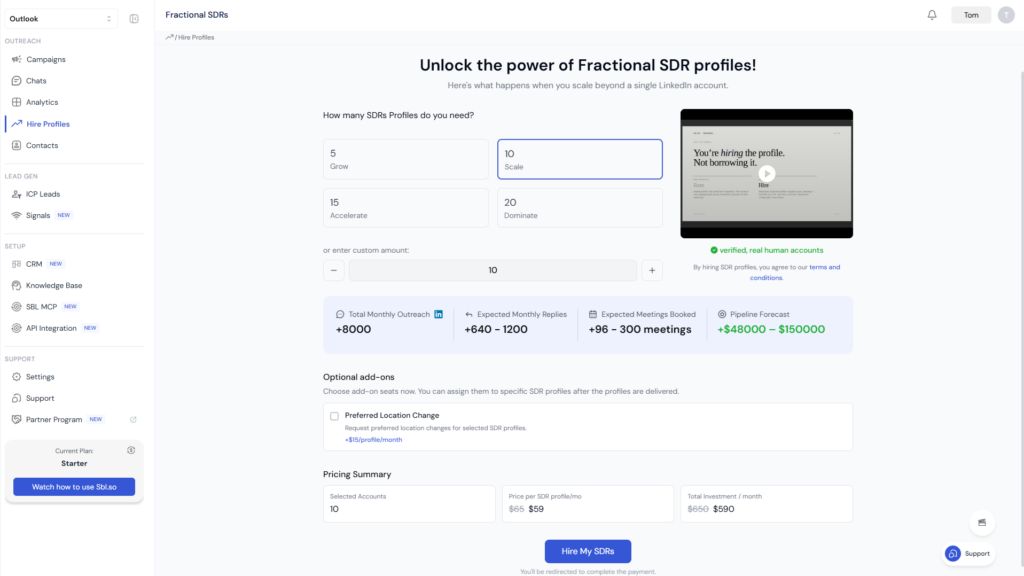
Starting rates are around $65/month for basic profile access. If you want them to also post content about your brand, that’s typically $100+/month additional.
The key difference: there’s no account to ban. If LinkedIn restricts someone, they deal with it personally like any normal user would. Your campaign just shifts to other profiles in your network.
Where to Find Fractional SDRs
Sbl.so has built a marketplace specifically for this. You can access verified LinkedIn users who’ve opted into running outreach campaigns. They become your affiliate partners, essentially extending your sales reach without the infrastructure headaches.
Combined with proper automation, you can hit serious volume. We’re talking 40,000+ touchpoints monthly across multiple profiles, all running through real accounts owned by real people.
Decision Matrix: Which Approach Fits Your Situation?
Let me give you a framework based on conversations with founders actually making this decision.
Choose Buying If:
- You have strong technical skills to manage proxies and browsers
- Your budget is extremely limited (under $500 to start)
- You’re okay with high ban risk and account replacement cycles
- You’re testing LinkedIn outreach before committing seriously
- You don’t mind spending hours troubleshooting
Choose Renting If:
- You need predictable infrastructure that someone else maintains
- You’re running an agency with multiple client campaigns
- Your time is worth more than the rental premium
- You want replacement guarantees when things go wrong
- You’re scaling to 10+ accounts and need volume discounts
Choose Fractional SDRs If:
- You want to remove ban risk entirely from your outreach equation
- You’re building long-term B2B infrastructure, not just quick campaigns
- You need the authenticity of real profiles with real networks
- You’re already using LinkedIn automation and want to scale safely
- You prefer paying people over paying for infrastructure
What About LinkedIn Limits in 2026?
I should address this because it affects all three approaches differently.
LinkedIn has tightened limits significantly this year. New or cold accounts face strict connection caps. Even warmed accounts on professional rental setups hit walls around 75-100 connection requests daily before triggering reviews.
The messaging limits are slightly more generous: around 200 messages per day to first-degree connections if you’re careful about pacing.
Here’s the thing though. These limits apply whether you rent, buy, or use fractional SDRs. The difference is how you handle the inevitable restrictions.
With bought accounts, a restriction often means permanent loss. With rented accounts, your provider swaps in a replacement. With fractional SDRs, you simply shift volume to other profiles in your network while the restricted one cools down.
If you want to understand the full picture of scaling outreach without getting banned, check out this guide on sending 1000 LinkedIn messages without getting banned.
Building Proper B2B Outbound Infrastructure
Whether you rent, buy, or hire, the infrastructure around your accounts matters as much as the accounts themselves.
The Account Layer
Most serious B2B teams in 2026 run 5-30+ accounts. That’s not aggressive, that’s just math. If each account can have 500-800 meaningful conversations per month, and you need 10,000 touchpoints to fill your pipeline, you need around 15-20 accounts minimum.
The Infrastructure Layer
Each account needs consistent environmental signals:
- Residential or mobile proxies (never datacenter IPs)
- Stable browser sessions with persistent cookies
- Geographic consistency between account history and current usage
- Realistic usage patterns that match human behavior
The Automation Layer
You’re probably using tools like Expandi, HeyReach, or Dripify for sequences. But here’s where most teams stop short: these tools send messages, they don’t have conversations.
When a prospect replies, someone still has to respond manually. That’s a bottleneck that doesn’t scale.
This is where AI-powered chat automation becomes valuable. Systems that can handle objections, ask qualifying questions, and push toward booking calls without human intervention on every message.
Sbl.so built this specifically for LinkedIn. The AI doesn’t just send sequences, it actually converses with prospects based on their responses. When it encounters something it can’t handle, it flags for human intervention. Over time, it learns from those interventions.
The result? You’re not just scaling outreach, you’re scaling conversations. Which is the actual bottleneck for most B2B teams.
Common Questions About Renting and Buying LinkedIn Accounts
Can I run automation tools on rented accounts?
Yes, this is the primary use case. Professional rental providers specifically support integration with tools like Expandi, HeyReach, Dripify, and similar platforms. They’ll provide the proxy and browser configuration needed for stable connections.
How long do rented accounts typically last before restrictions?
With proper setup and controlled volumes, professional rented accounts can run 6-12+ months without major issues. But expect some percentage of restrictions regardless. Good vendors replace accounts as part of their service.
Is it legal to rent or buy LinkedIn accounts?
It’s against LinkedIn’s Terms of Service, not illegal in a criminal sense. The practical risk is account loss, not legal action. That said, if your business model depends entirely on this infrastructure, you should understand the platform risk.
What’s the minimum volume where renting makes sense vs buying?
I’d say the crossover point is around 5 accounts. Below that, the rental fees add up quickly relative to just buying and accepting some loss. Above 5 accounts, the infrastructure management becomes enough of a headache that paying someone else to handle it starts making sense.
Can I convert a rented account into a bought account?
Generally no. The provider owns the account and the recovery credentials. You’re paying for usage rights, not ownership. If you stop paying, you lose access.
How do I evaluate rental vendors?
Key questions to ask:
- How old are the accounts and how long have they been operated?
- Are they ID-verified?
- What’s the replacement policy if an account gets restricted?
- What infrastructure do they provide (proxies, browsers)?
- Which automation tools have they tested compatibility with?
For a detailed comparison of vendors in 2026, see this review of LinkedIn profile rental services.
The Real Recommendation for 2026
If you’re reading this trying to decide between renting and buying LinkedIn accounts, here’s my honest take:
Buying is a false economy. The upfront savings get eaten by replacements, troubleshooting time, and inconsistent results. Unless you’re extremely technical and have hours to spend on infrastructure, skip it.
Renting works if you need immediate scale and don’t mind the monthly cost. It’s the safe middle ground. You’re paying a premium for someone else’s expertise in managing accounts.
Fractional SDRs are the future if you’re building something sustainable. Real people, real profiles, no account risk. The unit economics are similar to renting once you factor in time savings and reduced ban rates.
For most B2B teams I talk to, the best approach is a hybrid: start with a few rented accounts to test messaging and ICP fit, then scale through fractional SDRs once you’ve proven your outreach model works.
If you want to explore the fractional SDR approach, check out Sbl.so’s marketplace. You can connect with verified LinkedIn users who’ll run outreach campaigns for you, starting at $65/month per profile.
The days of worrying about whether to rent or buy LinkedIn accounts might be ending. The teams getting the best results in 2026 aren’t asking that question at all. They’re asking: how do I build outbound infrastructure that doesn’t depend on gaming LinkedIn’s systems?
That’s a much better question.