If you’re reading this, you’re probably one of two people. Either you’ve been burned by a LinkedIn automation tool before and you’re being extra careful this time. Or you’re comparing Dripify against three other tabs right now and you just want someone to tell you the truth. I get it. I’ve been there. Let me tell you what 500+ paid users across G2, Capterra, Trustpilot, and Reddit actually say about Dripify in 2026, not the marketing copy.
What Is Dripify and Who Actually Uses It?
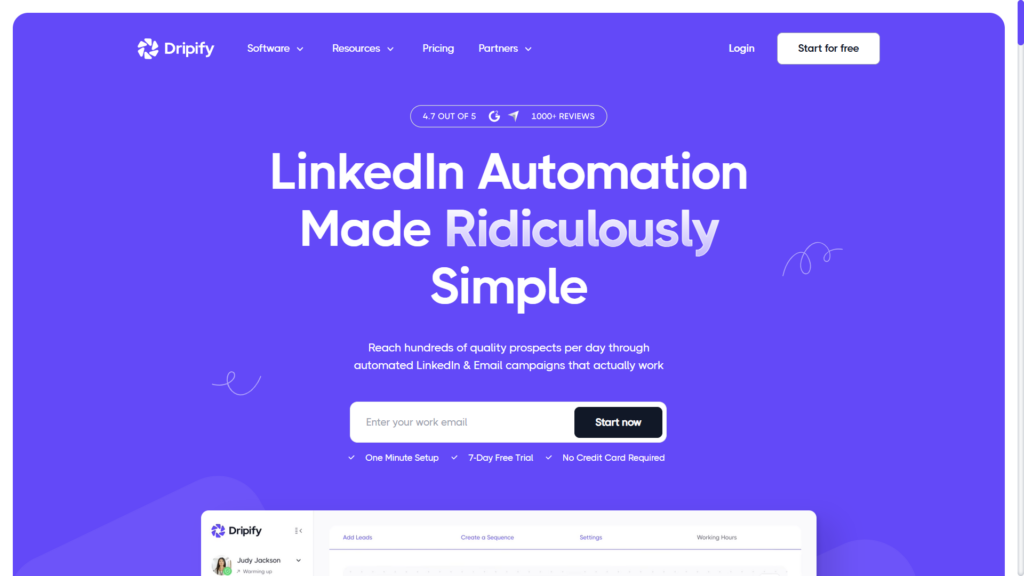
Dripify is a cloud-based LinkedIn automation tool. That’s it. It automates connection requests, follow-ups, profile visits, and drip campaigns. No email. No WhatsApp. No AI chat replies. Just LinkedIn sequences.
The people who love it tend to be solo SDRs, recruiters, founders doing their own outreach, and small teams that want something simple. If you just need to send connection requests, follow up automatically, and track who opened what, Dripify does that job.
But here’s the thing. It’s 2026. The bar has moved. A lot of people signing up for Dripify expect AI personalization, multi-channel workflows, or at least some form of intelligent conversation handling. They’re disappointed when they realize it’s basically a scheduling tool with if-else logic.
Dripify Pricing: What You’ll Actually Pay
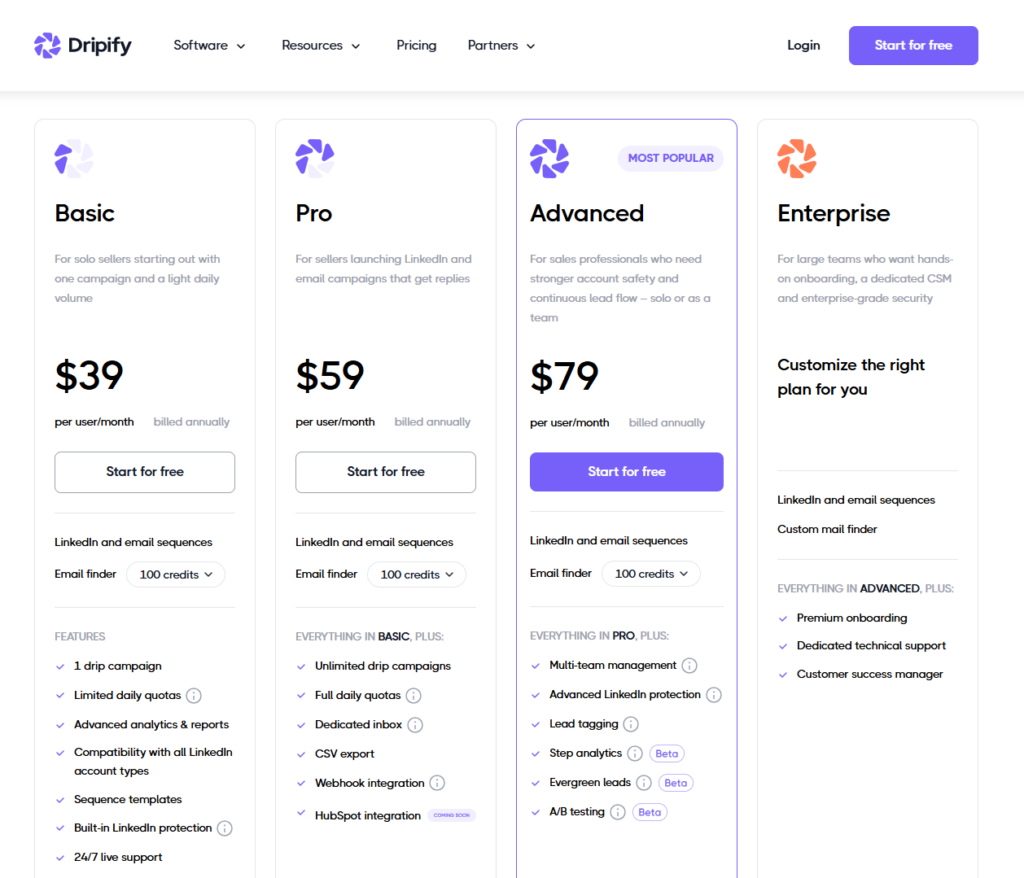
This is where things get a little confusing because different sources report different numbers. Here’s what I found across the most recent reviews:
- Basic: $39 to $59 per user per month depending on whether you’re billed annually or monthly
- Pro: $59 to $79 per user per month
- Advanced: $79 to $99 per user per month
- Enterprise: Custom pricing
The pricing looks reasonable at first. But here’s what users actually complain about. Feature access is gated by tier, not by sending volume. So you might hit the plan you need pretty quickly if you want team features, better analytics, or A/B testing.
Multiple G2 and Capterra reviews mention billing issues specifically. Not huge ones. Just small friction things like unexpected charges, difficulty canceling, or confusing tier upgrades. Not dealbreakers, but worth knowing.
What Do Real Users Say About Dripify?
I spent way too much time reading through G2, Capterra, Trustpilot, and Reddit threads. Here’s what patterns actually emerged.
What Users Like About Dripify
- Setup is genuinely easy. Most people get their first campaign running in under 30 minutes. The UI is clean. No engineering degree required.
- Campaign automation works. Connection requests, auto follow-ups, profile visits, and sequencing all function as advertised.
- Good for LinkedIn-only workflows. If you don’t need email or other channels, it does one thing and does it okay.
- Analytics are decent. You can track who connected, who replied, who ghosted you. Basic stuff, but it’s there.
What Users Complain About
- Pricing complaints are everywhere. Even users who rate Dripify 4 or 5 stars mention that it feels expensive for what you get. The linked analysis from LinkedHelper says pricing is the main exit reason in their churn data.
- Billing issues pop up repeatedly. G2 specifically flags this as a review theme. Small things, but they add up.
- Customer support is hit or miss. Some users report fast responses. Others say they waited days. Capterra shows 4.6 out of 5 for customer service, which is good but not perfect.
- Account safety concerns exist. This is where sources disagree. One 2026 review says Dripify is among the safer LinkedIn automation tools. Another claims restriction risk increased after LinkedIn’s May 2026 enforcement wave. I’d treat safety as mixed and source-dependent.
- No real AI. Users who expected AI-driven personalization or intelligent chat handling are disappointed. It’s templates and sequences, not conversation intelligence.
G2 currently shows Dripify at 4.5 out of 5 with 348 reviews. Capterra reports 476 verified reviews with 4.7 for ease of use. Trustpilot has 363 customer service reviews. The direction is consistent: mid-to-high 4-star range across platforms.
Dripify Pros and Cons: The Honest Breakdown
Let me give you the summary version.
Pros
- Easy to set up and use
- Reliable LinkedIn automation for basic workflows
- Straightforward sequencing and campaign builder
- Team management features on higher tiers
- Built-in LinkedIn protection measures
Cons
- Limited to LinkedIn only, no multi-channel
- Basic personalization, nothing AI-driven
- Pricing feels high for the functionality
- Billing and support friction reported by users
- Account safety risk still exists, especially with aggressive settings
Does Dripify Have Real AI?
Short answer: not really. The 2026 reviews I found focus on automation, sequencing, templates, and analytics. Not AI personalization. Not conversation intelligence. Not intent detection.
If you’re looking for something that actually replies to your prospects, handles objections, and books calls without you manually managing every chat, Dripify isn’t built for that. It stops at sending messages. When someone replies, you’re on your own.
This is actually the biggest gap I see. In 2026, people expect AI sales automation to mean something. They expect the tool to handle the conversation, not just trigger it. Dripify is still fundamentally a scheduler with smart sequences.
Dripify vs Alternatives: How Does It Compare?
Let me walk you through how Dripify stacks up against the tools people usually compare it to.
Dripify vs HeyReach
HeyReach is positioned similarly for LinkedIn automation. Both do connection requests, follow-ups, and sequencing. HeyReach tends to be preferred by agencies managing multiple accounts. Dripify tends to be preferred by individual users or small teams who want simplicity. Neither has real AI chat handling.
Dripify vs Expandi
Expandi is another cloud-based LinkedIn automation tool in the same category. Users report similar ease of use. Pricing is comparable. The main difference is in specific feature access and safety configurations. If you want a detailed comparison, check out our Expandi alternatives breakdown.
Dripify vs PhantomBuster
PhantomBuster is more of a data extraction and automation toolkit than a dedicated LinkedIn outreach platform. It’s more flexible but also more complex. Dripify is simpler to use but less powerful. Different tools for different needs.
Dripify vs Full AI SDR Platforms
This is where the gap becomes obvious. Tools like SBL.so don’t just send messages. They handle the entire conversation. They reply to prospects, handle objections, follow up intelligently, and book calls without you managing every chat manually.
Dripify is a scheduler. AI SDR tools are conversation engines. If you’re comparing Dripify to something like SBL.so, you’re comparing two different product categories. Dripify starts the conversation. SBL.so finishes it.
For a direct comparison, you can read our Dripify vs SBL.so breakdown or check out Dripify alternatives that actually include AI chat handling.
Is Dripify Safe for Your LinkedIn Account?
This is the question everyone asks and the one where sources disagree the most.
One 2026 review says Dripify is among the safer LinkedIn automation tools because it uses cloud-based execution and has built-in limits. Another 2026 source claims LinkedIn restriction risk increased meaningfully after LinkedIn’s May 2026 enforcement wave.
My take: Dripify is safer than browser extensions but not immune to restrictions. If you use aggressive settings, high daily limits, or obvious template messages, you can still get flagged. The tool has safety features, but LinkedIn’s detection has also improved.
If you want to understand how to automate LinkedIn outreach safely or learn what to do if your account gets restricted, we’ve covered that separately. The short version: any automation carries risk. Dripify manages that risk okay, but not perfectly.
Who Should Use Dripify?
Based on the review patterns, Dripify makes sense for:
- Solo SDRs or recruiters who need basic LinkedIn automation
- Founders doing their own outreach who want simplicity over power
- Small teams that don’t need multi-channel workflows
- People who want to launch campaigns quickly without complex setup
Dripify probably isn’t right for:
- Teams that need AI-driven personalization or conversation handling
- Agencies managing many accounts who want better scaling features
- People who expect email plus LinkedIn plus WhatsApp in one tool
- Anyone who wants the automation to handle replies, not just send messages
Common Questions About Dripify
What is Dripify used for?
LinkedIn prospecting, automated connection requests, follow-up sequences, profile visits, and drip campaigns. It’s a LinkedIn-only automation tool.
How much does Dripify cost per month?
Between $39 and $99 per user per month depending on your tier and billing method. Basic starts around $39-59, Pro around $59-79, Advanced around $79-99.
Is Dripify worth the money?
For LinkedIn-only automation, probably yes if you’re a solo user or small team. For multi-channel or AI-driven workflows, probably no. The value depends entirely on what you actually need.
Can Dripify get my LinkedIn account restricted?
Yes, any LinkedIn automation can. Dripify has safety features, but aggressive settings or obvious templates still carry risk. Sources disagree on exactly how risky it is in 2026.
Does Dripify have AI?
Not in the way most people expect. It has automation and sequencing. It doesn’t have AI-driven chat handling, intelligent replies, or conversation personalization.
What are the best Dripify alternatives?
Depends on what you need. For similar LinkedIn automation, people compare HeyReach, Expandi, and similar tools. For actual AI chat handling and multi-channel outreach, you’d look at platforms like SBL.so. We have a full Dripify alternatives comparison if you want the detailed breakdown.
The Bottom Line on Dripify
Dripify is a solid, simple LinkedIn automation tool. It does what it says. It’s easy to set up. The UI is clean. Campaign automation works.
But it’s also 2026. The expectations have shifted. Users want tools that handle conversations, not just start them. They want AI that actually replies, follows up intelligently, and books calls without manual inbox management.
Dripify is a scheduler. A good one, but still a scheduler. If that’s what you need, it’ll probably work for you. If you need more, you should probably look at alternatives that actually include AI conversation handling.
The pricing complaints are real. The billing friction is real. The account safety concerns are mixed. The lack of AI is a gap if you expected something smarter.
If you want to send automated messages on LinkedIn and track basic metrics, Dripify handles that. If you want a system that actually sells for you while you focus on closing, you need a different category of tool entirely.
That’s the honest Dripify review. Not a hit piece. Not marketing copy. Just what 500+ users actually report across the platforms where real feedback lives.