Black Friday 20% off your first 3 months on any plan.

0 Days
:
00 Hours
:
00 Mins
:
00 Secs
Claim 20% off →
G24.7 on G2Used by 5,000+ teams

Lookalikes · SBL Leads

Lookalike Company Finder: Find More Companies Like Your Best Customers.

Your best customers already describe your ICP better than any filter. Paste up to 10 of their LinkedIn company pages into the lookalike company finder in SBL, pick the roles you want, and get leads at similar companies, ready for outreach in the same workspace.

  • 7-day free trial
  • Up to 10 seed companies
  • 2 credits per lead
Lookalikes · New searchIllustrative
Find lookalike leads
CompanyIndividual
Seed company LinkedIn URLs3 of 10 · one per line
linkedin.com/company/acme-ledgerlinkedin.com/company/brightpath-paylinkedin.com/company/northwind-capital
Target rolesOptional
FoundersOwnersMDsCEOs
Number of leads
50
Credits used
100 (2 per lead)
Example setup · company names are illustrativeFind lookalikes
5,000+
teams use SBL across 1,000+ companies
50M+
messages sent through the platform
$38.5M
in pipeline created by customers
0
account bans, with a 99.7% safety rate

The problem

Why Keyword Searches Miss Your Best-Fit Accounts

Your best customer is rarely “SaaS, 50 to 200 employees”. It is a specific mix of model, market, stage and buyer that is hard to type into a filter. So the list comes back too wide, or it misses the companies that look most like the ones already paying you.

Filters flatten what makes a customer good

Industry and headcount fit thousands of companies. Only some of them buy like your customers do.

Manual research does not scale

Opening every competitor of every customer works for 20 accounts, not 200.

Starting from customers keeps you honest

Seed companies are a fact, not a guess. The output is anchored to who already said yes.

How it works

How Does the Lookalike Company Finder Work?

Four fields, one click. Most of the thinking goes into which seeds you pick.

1

Pick a mode

The setup dialog has two modes: Company and Individual. To find companies like your customers, use Company mode and start from their LinkedIn company pages.

Mode
CompanyIndividual
Company mode: start from company LinkedIn pages.
Individual mode: the second option in the same dialog.
2

Paste up to 10 seed companies

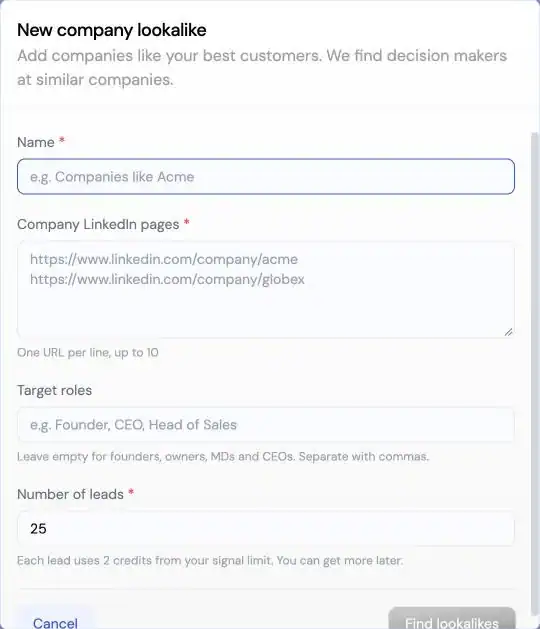
Add the LinkedIn URLs of the companies you want more of, one per line, up to 10. One seed works. A tight group of similar seeds gives the AI a clearer pattern.

Seed companies3 of 10
linkedin.com/company/acme-ledgerlinkedin.com/company/brightpath-paylinkedin.com/company/northwind-capital

One LinkedIn company URL per line. Up to 10.

3

Choose target roles, or keep the default

Tell SBL who to find at each lookalike company. Leave it empty and it looks for founders, owners, MDs and CEOs, which suits smaller companies where the top person still buys.

Target rolesOptional
Default if left empty
FoundersOwnersMDsCEOs
Example custom roles
VP SalesHead of GrowthRevOps Lead
4

Set the number of leads and run

Choose how many leads you want. Each lead uses 2 credits from your signal limit, so 50 leads use 100 credits. Review the results, then add them to a campaign.

ResultsExample
PNPriya Nair · VP SalesCalder Pay · Similar to Brightpath Pay
DMDaniel Moss · FounderKestrel Ledger · Similar to Acme Ledger
ARAisha Rahman · CEOHarbor Capital · Similar to Northwind Capital
50 leads · 100 creditsAdd to campaign

Credits

What Does a Lookalike Search Cost in Credits?

Simple math: every lead uses 2 credits from the same signal limit your Signal Agents draw on.

25 leads
50 credits
50 leads
100 credits
100 leads
200 credits
200 leads
400 credits

Signal limits differ by plan. Check the limits on the pricing page.

Inside the app

How to Pick Seed Companies That Work

The setup takes a minute. The seeds decide the quality of the list.
  1. 1Use customers who are actually goodPick accounts that bought fast, stayed and paid well. A bad-fit seed gives you more bad-fit leads.
  2. 2Keep one segment per searchTen seeds from ten different markets blur the pattern. Run separate searches per segment instead.
  3. 3Match roles to company sizeDefault roles suit small companies. For larger accounts, name the team lead who owns the problem.
  4. 4Start small, then scaleRun 25 leads first, review the fit, then run a bigger batch with the same seeds.
Lookalikes · Setupapp.secondbrainlabs.com
SBL lookalike finder setup dialog with Company and Individual modes, seed company URLs, target roles and number of leads
The lookalike setup dialog in SBL.

Use cases

Find Similar Companies for Every Outbound Motion

A lookalike audience for B2B works best when you already know what a good customer looks like.

Expand a winning segment

Ten fintech customers closing well? Seed with them and find the next batch of companies that look the same.

Test a new market

Seed with the two or three customers you have in a new vertical and see how deep the pool is before you commit.

Agency client onboarding

Ask a new client for their best accounts on day one, run a lookalike search, and launch a campaign in their workspace. See SBL for agencies.

Replace a stale list

When a list is worn out, seed with your latest wins and refresh the pipeline with fresh leads.

Compare

Lookalike Search vs. Filters vs. Manual Research

Three ways to find companies like your customers.

SBL Lookalike FinderFilter searchManual research
Starting pointUp to 10 real customer pagesIndustry, size, locationA spreadsheet of customers
Captures what makes a customer goodUses the seeds as the patternOnly what fits a filterYes, slowly
People, not just companiesLeads in the roles you pickExtra stepExtra step
Cost model2 credits per leadVariesYour team's time
OutreachSame workspace: LinkedIn, email, WhatsAppSeparate toolSeparate tool

Three ways to find leads

Pick the Lead Source That Fits the Job

The Lookalike Company Finder is one of three tools in SBL Leads. All three source leads from LinkedIn today and feed the same campaigns.

AI Lead Finder

Describe your ICP in plain English and get a LinkedIn lead list, built to land in under 10 minutes.

Explore AI Lead Finder

Buying Signals

Signal Agents watch for job changes, funding, hiring and competitor engagement, and add new leads every 24 hours.

Explore Buying Signals
You are here

Lookalike Company Finder

Start from your best customers and find leads at companies like them.

Pricing

Lookalikes, Leads and Outreach on One Plan

Lookalike searches draw on the signal limit in your SBL plan. Every plan starts with a 7-day free trial. Pay quarterly and save 20%.

Starter

$99/ month

$79.20 a month when billed quarterly.

Pro

$189/ month

$151.20 a month when billed quarterly.

Agency

$499/ month

Limited-time price. $399.20 a month when billed quarterly.

Signal limits per plan are listed on the pricing page.

Compare SBL plans and limits

FAQ

Frequently Asked Questions

It is a tool that takes companies you already know are a good fit, usually your best customers, and finds similar companies and the right people inside them. In SBL you paste company LinkedIn URLs, choose roles, and get leads back.

Up to 10 company LinkedIn URLs per search, one per line. One seed is enough to run a search, but a focused group of similar companies gives a clearer pattern.

Target roles are optional. If you leave them empty, SBL looks for founders, owners, MDs and CEOs at the lookalike companies.

Each lead uses 2 credits from your signal limit. A search for 50 leads uses 100 credits, and a search for 100 leads uses 200 credits.

The setup dialog offers both modes. Company mode starts from company LinkedIn pages and is the one to use when you want to find companies like your customers.

Yes. Review the leads, then add them to a campaign in the same SBL workspace. The AI writes personalized messages, replies to prospects, qualifies them and books meetings, and hands off to you when it should not guess.

Leads are sourced from LinkedIn today. Phone and email data are marked as coming soon in the app.

Plans are Starter at $99 a month, Pro at $189 a month and Agency at $499 a month for a limited time. Quarterly billing saves 20% and every plan starts with a 7-day free trial.

Find Your Next 50 Customers by Starting From Your Best 10.

Paste your best customers into the Lookalike Company Finder, pick the roles you sell to, and start outreach from the same workspace today.

7-day free trial · Up to 10 seed companies · 2 credits per lead
Lead Generation Guides

"Best LinkedIn Tool for Converting Engagement to Sales Leads - 2560x1440px, large white headline (72-80px bold) centered on image, minimalist LinkedIn icon with connecting arrows symbolizing engagement to leads, soft cloudy gradient background blending #3657D5 royal blue, light periwinkle, and deep navy, dreamy atmospheric aesthetic, 80px padding from all sides, NOT transparent, clean modern design --ar 16:9"

What is the best LinkedIn tool for turning post engagement into sales leads?

What is the best LinkedIn tool for turning post engagement into sales leads?
**Prompt for Image Generation**: "SDR Targeting Integrations 2026 - 2560x1440px, large white headline (72-80px) at the top left: 'Integrations for Enhanced SDR Targeting 2026', soft cloudy gradient background blending #3657D5 royal blue, periwinkle, pale azure, and deep navy tones, simple illustration of interconnected floating tech icons indicating integrations (magnifying glass, data chart, AI brain, CRM, and messaging bubbles), dreamy atmospheric aesthetic with 80px padding from all sides for clean composition, NOT transparent, depicting a network of enhanced targeting and lead optimization methods --ar 16:9"

Which integrations improve SDR targeting lead quality and conversion in 2026?

Which integrations improve SDR targeting lead quality and conversion in 2026?
"Best LinkedIn Lead Generation Tool 2026 - 2560x1440px, large white headline (72-80px bold) on left reading 'LinkedIn Lead Tool 2026', single large white LinkedIn icon centered with smaller tech icons (magnifying glass, network diagram) orbiting around it, dreamy atmospheric aesthetic, soft gradient blending #3657D5 royal blue, periwinkle, and light sky blue, with 80px padding from all sides, NOT transparent, clean, modern abstract composition --ar 16:9"

What is the best tool to find high-intent leads on LinkedIn in 2026?

What is the best tool to find high-intent leads on LinkedIn in 2026?
**Style E - Centered Icon Minimal:** "Competitor Engagement on LinkedIn: Find Ready-to-Buy Prospects - 2560x1440px, 'Sbl.so' text branding (32px, white, top left), large white headline 'Competitor Engagement: Find Ready-to-Buy Prospects' (72-80px bold) centered for impact, centered minimalistic LinkedIn icon with a magnifying glass to signify engagement and prospecting, dreamy atmospheric aesthetic, soft cloudy gradient blending shades around #3657D5 with sky blue, periwinkle, and navy, 80px padding from all sides, NOT transparent, clean modern composition --ar 16:9"

Competitor Engagement on LinkedIn: Find Ready-to-Buy Prospects

Competitor Engagement on LinkedIn: Find Ready-to-Buy Prospects
Scroll to Top
Exclusive: Top 1% onlyJoin our Community (for FREE)