01
You are the bottleneck
Every lead on WhatsApp waits for you to reply. Calls, meetings and sleep all mean slower answers and colder leads.
Black Friday 20% off your first 3 months on any plan.
WhatsApp Direct · Beta
No new number. No Meta setup. Scan one QR code and SBL runs WhatsApp Business automation from your existing number as a linked device: AI replies, qualification and booked meetings, inside the hours you set.
5,000+ teams run outbound on SBL
1
QR scan to link your number
0
new numbers or Meta setup needed
50M+
messages sent through SBL
5 to 10x
more meetings than manual outreach, as reported by customers
The problem
Your best conversations already happen on WhatsApp. The problem is keeping up with them.
Every lead on WhatsApp waits for you to reply. Calls, meetings and sleep all mean slower answers and colder leads.
Typing the same intro to 30 people, then tracking who replied in your head, burns an afternoon and still misses follow-ups.
Meta Business Manager, approved templates and per-message pricing make sense at volume. For a founder with warm leads, it is a lot of setup.
How it works
Four steps. Most of the time goes into choosing who to message, which is how it should be.
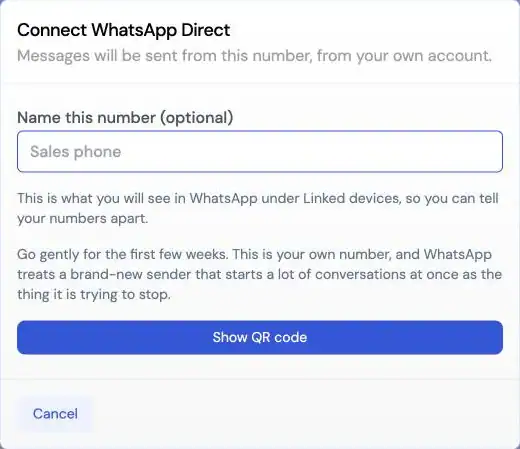
In SBL Settings, choose WhatsApp Direct. Give the number a name so you know which line is which.
A clear name helps when your team links more than one number.
Open WhatsApp, go to Linked devices and scan the code. SBL is added to your number as a linked device.
Pick the days and hours SBL may send. Your leads hear from you during business hours, not at 2 AM.
Example schedule. Messages outside these hours wait for the next window.
Upload a CSV or pick leads, start the campaign, and SBL writes, replies, qualifies and books. Anything unclear is flagged for you.
What you get
Sending is the easy part. SBL is built for what comes after the first reply.
AI replies in your voice: SBL reads the thread and answers like a person on your team. It handles objections and moves toward a meeting.
Qualification built in: It asks the questions you would ask, then books only the leads that fit.
Human Intervention Required: When a reply needs judgment, SBL flags it and waits. It does not guess.
Take over any chat: Jump into any conversation from SBL, at any point.
Unified inbox: WhatsApp replies sit next to LinkedIn and email replies, per lead.
Bring your own leads: Upload a CSV, or add leads found with SBL's lead tools.
Use it well
WhatsApp Direct is not the official API. It runs on your real number, so treat that number like the asset it is.
SBL itself warns you about this. Start with small batches of people who know you, then grow slowly. A sudden spike from a quiet number looks like spam.
Event attendees, inbound leads, existing contacts, people who asked you to follow up on WhatsApp. Cold blasting a scraped list is how numbers get reported.
Use sending hours that match when you would actually type. It protects your number and your reputation.
Linked-device sessions can drop. If that happens, re-scan the QR code in SBL and you are back.
Beta, and not the official API. WhatsApp Direct links your number as a linked device. It is not the WhatsApp Business Platform, and SBL is not affiliated with or endorsed by Meta or WhatsApp. Follow WhatsApp's terms. If you need template campaigns at volume, use the WhatsApp Cloud API channel instead.
Pick your channel
Both channels get the same AI SDR, hand-off and unified inbox. Pick by how you want to connect.
Scroll sideways on small screens to see every column.
| WhatsApp Direct (Beta) | WhatsApp Cloud API | |
|---|---|---|
| How you connect | Scan a QR code, SBL links as a device on your number | Meta Business Manager channel in SBL Settings |
| Number | The number you already use | A number on your WhatsApp Business account |
| Official Meta API | No. Linked-device session | Yes, WhatsApp Cloud API |
| First message | A normal message from your number | A Meta-approved template outside the 24-hour window |
| Who to message | People who expect to hear from you | Contacts who opted in |
| Costs beyond SBL | No Cloud API message fees | Meta's template message pricing |
| Watch out for | Disconnects that need a re-scan; go gently at first | Template approval and Meta messaging limits |
| Best for | Founders and small teams with warm leads | Teams scaling consent-based campaigns |
Pricing
WhatsApp Direct comes with your SBL plan, alongside LinkedIn and email. Start with a 7-day free trial.
For a founder or a small team running its first multi-channel campaigns.
Start the 7-day free trialFor teams running more campaigns and channels at the same time.
Start the 7-day free trialFor agencies running outreach for several clients.
Start the 7-day free trialWhatsApp Direct uses your own number, so there are no Cloud API message fees on top of your plan.
See full plan details on the pricing pageOne workspace
Some leads answer on LinkedIn. Some only reply on WhatsApp. SBL keeps them all in one inbox.
Connection requests, messages and AI replies from the same workspace. See LinkedIn automation.
Mailbox rotation, warm-up and smart follow-ups. See cold email on SBL.
Find leads by ICP prompt, buying signals or lookalike companies. See B2B lead generation.
Use the Public API or run outreach from Claude with the MCP server.
FAQ
It is AI-run outreach and replies from your existing WhatsApp number. You link the number to SBL by QR code as a linked device, and SBL writes messages, replies to prospects, qualifies them and books meetings.
Yes. WhatsApp Direct links the number you already use. You name the number in SBL, scan the QR code from WhatsApp Linked devices, and set your sending hours.
No. WhatsApp Direct works as a linked device on your number. It is not the official WhatsApp Business Platform, and SBL is not affiliated with Meta or WhatsApp. For the official API, use SBL's WhatsApp Cloud API channel through Meta Business Manager.
Use it carefully. Go gently for the first weeks, only message people who expect to hear from you, and keep sending hours realistic. WhatsApp Direct is in Beta, and no tool can promise a number will never be restricted.
Linked-device sessions can disconnect. When that happens, open SBL and re-scan the QR code from WhatsApp Linked devices to reconnect the number.
Yes. You can take over any chat. When the AI is not sure how to answer, it flags the chat as Human Intervention Required instead of guessing.
WhatsApp Direct is part of your SBL plan: Starter $99 per month, Pro $189, or Agency $499 for a limited time. Quarterly billing saves 20%, and every plan starts with a 7-day free trial.
Link your number with one QR scan, set your hours, and let the AI SDR reply, qualify and book. You step in only when it matters.
7-day free trial · Plans from $99/mo · 4.7 on G2