I spent 2 months warming up mailboxes only to watch my first real campaign land in spam anyway. Two months. That’s 60 days of sending fake emails to a warm-up network, watching little green checkmarks tell me everything was fine, and then getting absolutely destroyed the moment I tried to reach actual prospects.
The second time, we bought 12 domains, set up 36 mailboxes, configured all the DNS records, and waited again. By the time we launched, our competitor had already closed the deals we were chasing. That’s when we switched to pre-warmed mailboxes.
This guide covers what pre-warmed mailboxes (also called pre-warmed email accounts or pre-warmed inboxes) are, what they really cost once you add the fees vendors leave off the landing page, how to vet a provider, and how to use them without burning them.
Last updated: November 22, 2026. Full disclosure: I build Sbl.so, so I’m biased. The math below includes the places where we are not the cheapest.
TL;DR: Buy Pre-Warmed Mailboxes
Pre-warmed mailboxes are email accounts with 2 to 6 weeks of sending history, so you skip the 3 to 4 week warm-up and start cold outreach sooner. Mailboxes cost $4 to $10 each per month, but most vendors add domains ($12 to $18 a year each), a sequencer ($37 to $97 a month) and a warm-up tool ($29 to $50 a month).
Sbl.so sells Google Workspace mailboxes at $9/month pre-warmed (ready the same day) or $6/month on-demand (ready for outreach after a 14-day warm-up). No domain fees. Buy and import as many as you need. One $99/month platform fee covers the sequencer, warm-up, unified inbox, AI reply handling, plus LinkedIn and WhatsApp outreach, and it does not go up as you add mailboxes.
Buy pre-warmed mailboxes on Sbl.so
What Is a Pre-Warmed Mailbox?
A pre-warmed mailbox is a Google Workspace or Microsoft 365 account that has already been through the warm-up process before you get your hands on it. Think of it like buying a seasoned cast iron pan instead of a brand new one. Someone else did the boring work of sending 5 emails on day one, 10 on day two, and gradually building volume over weeks while exchanging replies with other accounts.
The result? When you start sending, Gmail and Outlook don’t see you as a suspicious new sender. They see an account with history, engagement patterns and what looks like legitimate business activity.
What “pre-warmed” should actually mean
- Established sending history: at least 14 to 21 days, ideally 3 to 4 weeks or more. Some providers claim 6 to 12 weeks on premium accounts.
- Varied recipient domains: mail sent to Gmail, Outlook, Yahoo and corporate domains, not just one provider
- Natural reply patterns: genuine replies received, not just automated ping-pong exchanges
- Clean reputation: no spam complaints, no hard bounces, no abuse flags
- Proper authentication: SPF, DKIM and DMARC already configured correctly
- Active receiving: the mailbox can receive and does receive normal email
Pre-warmed is not the same as aged
An aged domain or mailbox is simply one that has existed for a while. Age alone doesn’t prove good email reputation. A domain could be 5 years old and have never sent a legitimate email. Or worse, it could have been used for spam by a previous owner. Age without activity doesn’t equal reputation. You want recent, consistent, positive sending activity.
And pre-warmed doesn’t mean permanent. The reputation you inherit is a starting point, not a guarantee. Send garbage to a bad list and you’ll burn that reputation in days.
Why New Mailboxes Need Warm-Up (and What Waiting Costs)
Email providers are essentially running a massive trust system. Every email account starts with zero reputation. Gmail, Outlook and Yahoo have no idea if you’re a legitimate business or a scammer, so they watch your behavior. How many emails do you send? Who replies? Do people mark you as spam? Do your emails bounce?
Create a brand new Google Workspace account and immediately send 50 cold emails, and Gmail flags the sudden spike in outbound volume. It notices you have zero receiving history. It sees that every message looks suspiciously similar. Within 72 hours, maybe less, you’re landing in spam.
I learned this the hard way. We launched a campaign from a 2-week-old mailbox, sent 200 emails in one day because we were impatient, and deliverability dropped to around 30%. Most emails went straight to spam. It took another month to recover.
Providers want to see gradual volume increases over weeks, two-way conversations, replies, low bounce and complaint rates, and authentication that passes consistently.
How long warm-up takes for a fresh mailbox
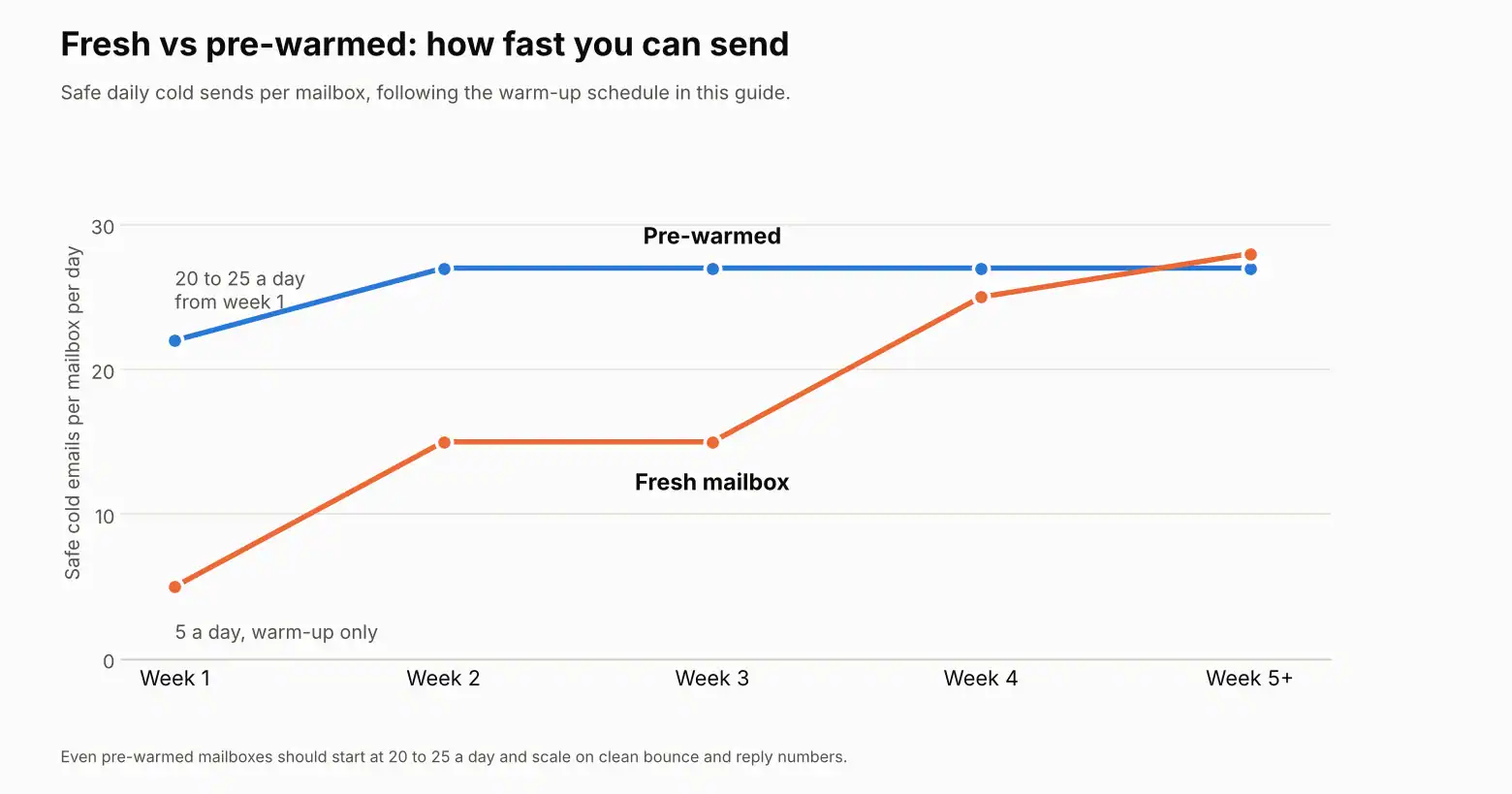
- Days 1 to 7: about 5 to 20 warm-up emails per day
- Weeks 2 to 3: gradually increase to 20 to 35 per day
- Weeks 3 to 4: introduce small cold email volumes if metrics look healthy
- Week 4 onward: cautiously scale toward 25 to 30 cold emails per day per mailbox
Google Workspace typically takes 14 to 16 days to warm up. Microsoft 365 takes 17 to 21 days. Either way, you’re looking at roughly a month before a fresh mailbox can handle meaningful cold outreach. And even then, warm-up activity needs to keep running alongside your campaigns.
The real cost of waiting 4 weeks
Say you’re building an outbound system with 10 mailboxes. You buy domains, set up Google Workspace, configure SPF, DKIM and DMARC, connect a warm-up tool and wait. Weeks 1 to 4: zero outreach, zero pipeline.
If your average deal size is $10,000 and cold email typically generates 2 to 3 qualified opportunities per 1,000 sends, that’s potentially $20,000 to $30,000 in pipeline you didn’t create every month you delay. Pre-warmed mailboxes are about time-to-revenue, not just convenience.
How Pre-Warmed Mailboxes Are Made
A provider sets up fresh Google Workspace or Microsoft 365 accounts on clean domains weeks or months before you need them. They configure all the DNS authentication (SPF, DKIM, DMARC, MX records). Then they run the mailboxes through a warm-up system.
During warm-up, the system sends emails to other mailboxes in the network. Those mailboxes open the emails, reply to them, and sometimes move them from spam to inbox. This signals to Gmail and Outlook that the sending account is legitimate and people want its emails.
After the warm-up period (usually 14 to 21 days minimum), the mailbox has baseline reputation and the provider sells or provisions it to you. You essentially skip the line.
But not all pre-warmed mailboxes are created equal. Most warm-up tools send emails between accounts in the same network, essentially inboxes talking to each other in a closed loop. That creates activity, but it isn’t the same as real humans engaging with your emails, and providers are getting better at detecting these patterns. Whether longer warm-up (6 to 12 weeks) translates to meaningfully better deliverability is debatable, but it’s not nothing.
How Much Do Pre-Warmed Mailboxes Cost?
Here’s what happens when you set up cold email infrastructure the traditional way. You find a provider advertising $4 mailboxes. Then you discover domains cost $12 to $18 each, and you need several domains to send safely. Then you need a warm-up tool ($29 to $50 a month) and a sequencer to actually send campaigns ($37 to $97 a month).
The advertised mailbox price is rarely the complete cost. The real formula:
Total monthly cost = mailbox fees + domain fees + warm-up + sending platform + inbox placement testing + replacement costs
Run a single $4 mailbox on that stack ($4 mailbox, $1 domain, $37 sequencer, $29 warm-up, $50 placement testing) and you’re paying about $121 a month. The fixed tool costs only get cheaper per mailbox as you add more, which is why total cost at your real volume is the number that matters.
Price per provider (10 mailboxes)
| Provider | Mailbox price | Domains | Sequencer and warm-up | Real monthly cost, 10 mailboxes |
|---|---|---|---|---|
| Sbl.so | $6 on-demand (14-day warm-up), $9 pre-warmed (same day) | $0, included | Included in $99 platform | $159 to $189 |
| Instantly | $10 (Google) | Included, Instantly keeps admin ownership | Requires $37 to $97+ subscription | $137 to $197+ |
| Puzzle Inbox | $3 to $4.50 (Google), $0.35 to $0.50 (Outlook) | Separate | Not included | $80 to $150+ |
| LiteMail | $4 to $4.99 | ~$39/month domain package | Not included | $89 to $130+ |
| Zapmail | $6 to $8 | Separate | Not included | $80 to $120+ |
| Getlead | $8.25 | Separate (transfer process) | Not included | $82.50 + domains + sequencer |
| Infraforge | ~$17 (annual billing) | ~$70/year | Partial managed service | $170+ with domain commitments |
What each one is like in practice:
- Instantly is highly centralized, which is nice. But the baseline software subscription adds up fast, and they retain administrative ownership over the mailboxes they provision. You’re renting, not owning.
- Puzzle Inbox has the cheapest Outlook pricing on paper and publishes verified delivery scores. But it’s raw infrastructure. You export the accounts into a separate sequencer, and that’s where the hidden cost appears.
- LiteMail claims 12 weeks of warm-up history and clean IP matching, which is solid. Zero campaign features are built in.
- Zapmail specializes in Google and Microsoft 365 accounts. You still need another tool subscription to run campaigns.
- Getlead gives full warm-up log access and transfers the domain to you.
- Infraforge is the premium managed option. Higher touch, higher price, minimum mailbox slots (10 mailboxes minimum).
Competitor prices come from their public pages and change often. Check before you buy.
20 mailboxes (about 500 emails a day)
Scenario: you want to send 500 cold emails per day. At 25 emails per mailbox per day, that’s 20 mailboxes across 5 domains.
| Setup | Mailboxes | Domains | Sequencer and tools | Monthly total |
|---|---|---|---|---|
| Sbl.so (Google Workspace, $6 on-demand to $9 pre-warmed) | $120 to $180 | $0 | $99 platform (sequencer, warm-up, AI replies, LinkedIn, WhatsApp) | $219 to $279 |
| Puzzle Inbox + external sequencer | $80 to $90 | $60 to $90 per year | $50+ | $140 to $160+ |
| LiteMail + external sequencer | $80 to $100 | $39+ | $50+ | $170 to $200+ |
| Self-built: Google Workspace + warm-up tool + sequencer | $100 | $20 | $49 warm-up + $97 sequencer | $266, plus a 4-week wait |
| Instantly pre-warmed | $200 | Included | $97+ | $297+ |
50 mailboxes
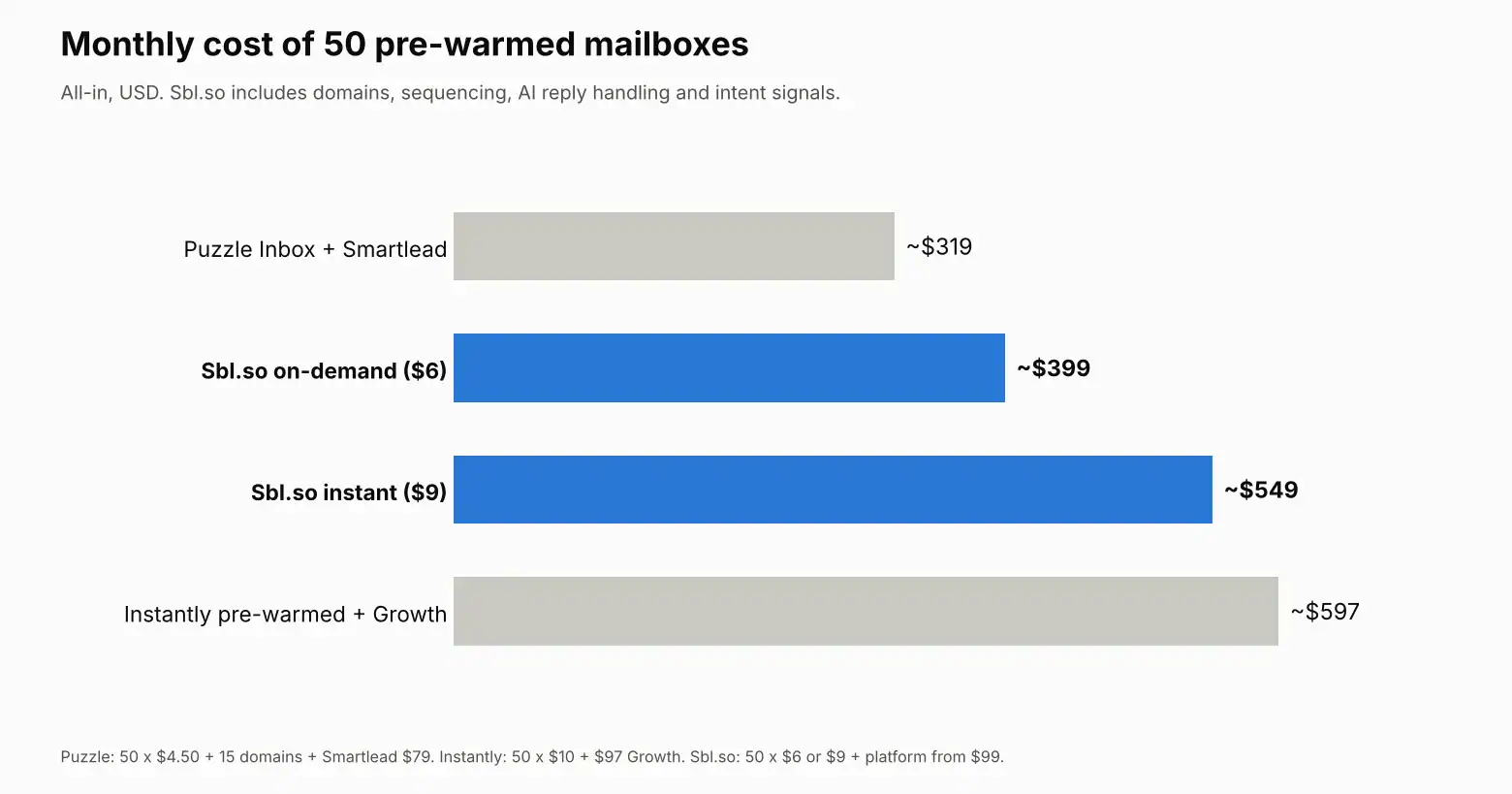
Most cold email operations use 3 to 5 mailboxes per domain, so 50 mailboxes means about 15 domains.
Puzzle Inbox + external sequencer:
50 mailboxes x $4.50 = $225/mo
15 domains x $1/mo (annualized) = $15/mo
Smartlead = $79/mo
Total: ~$319/mo
Instantly with pre-warmed accounts:
50 mailboxes x $10 = $500/mo
Growth subscription = $97/mo
Total: ~$597/mo
Sbl.so:
50 Google Workspace mailboxes x $6 on-demand = $300/mo (or x $9 pre-warmed = $450/mo)
Domains = $0
Platform = $99/mo
Total: ~$399 to $549/mo
How to read these numbers
Puzzle Inbox plus a sequencer is the cheapest raw setup. If you only want mailboxes and already run a sequencer you like, it can win on price.
Sbl.so’s $99 platform fee is the minimum you pay, and it’s a fixed fee. It does not go up as you scale. Whether you run 10 mailboxes or 200, the same $99 covers the sequencer, warm-up, mailbox rotation, unified inbox and AI reply handling, plus LinkedIn automation and WhatsApp outreach. So the more mailboxes you add, the smaller that fee gets per mailbox, and you never buy a separate sequencer, warm-up tool or LinkedIn tool on top.
And that’s before you count the time cost of managing 3 to 4 separate vendor relationships.
The full infrastructure you actually need
Most vendors only sell you one piece. To run cold email at scale you need:
- Pre-warmed mailboxes: the accounts you send from
- Domains: the web and email identity
- DNS configuration: SPF, DKIM, DMARC records
- Warm-up tool: to maintain reputation after purchase
- Sequencer: to write and schedule campaigns
- Unified inbox: to manage replies across accounts
- Account rotation: to distribute sending across mailboxes
- Analytics: to track what’s working
When you buy from most providers, you get items 1 through 3. Maybe 4. Items 5 through 8 require separate tools and subscriptions. You’re not buying a mailbox. You’re building an outbound system.
Pre-Warmed Mailbox Providers by Type
The market has gotten crowded. Providers fall into four types:
- Mailbox-only providers. You get the email account and maybe DNS configuration. You bring your own outreach platform. Typically $4 to $8 per mailbox, domains often extra. Works for teams that already run Smartlead, Instantly or another sequencer. Doesn’t work if you want an all-in-one solution.
- Mailbox and domain bundles. The mailbox comes with a secondary domain and full DNS setup. Faster deployment, less technical work. Watch domain ownership and transfer terms. Some providers retain control.
- Full infrastructure platforms. Mailboxes, warm-up, sending and monitoring in one system. Operational simplicity, no stitching together 4 to 5 tools. Usually a higher monthly cost than piecing things together.
- Complete sales outreach systems. These add lead sourcing, AI personalization, multichannel outreach and reply management. Sbl.so falls into this category. Prospecting through pipeline in one platform, with more features to learn.
Comparing specific tools? See the Zapmail alternatives, Instantly alternative and Smartlead vs Instantly vs Sbl.so breakdowns.
What to Check Before You Buy Pre-Warmed Email Accounts
I’ve seen teams buy cheap aged accounts from sketchy marketplaces and get burned within a week. I’ve also seen teams overpay for premium infrastructure that didn’t perform any better than mid-tier options. Ask every vendor these questions before you pay.
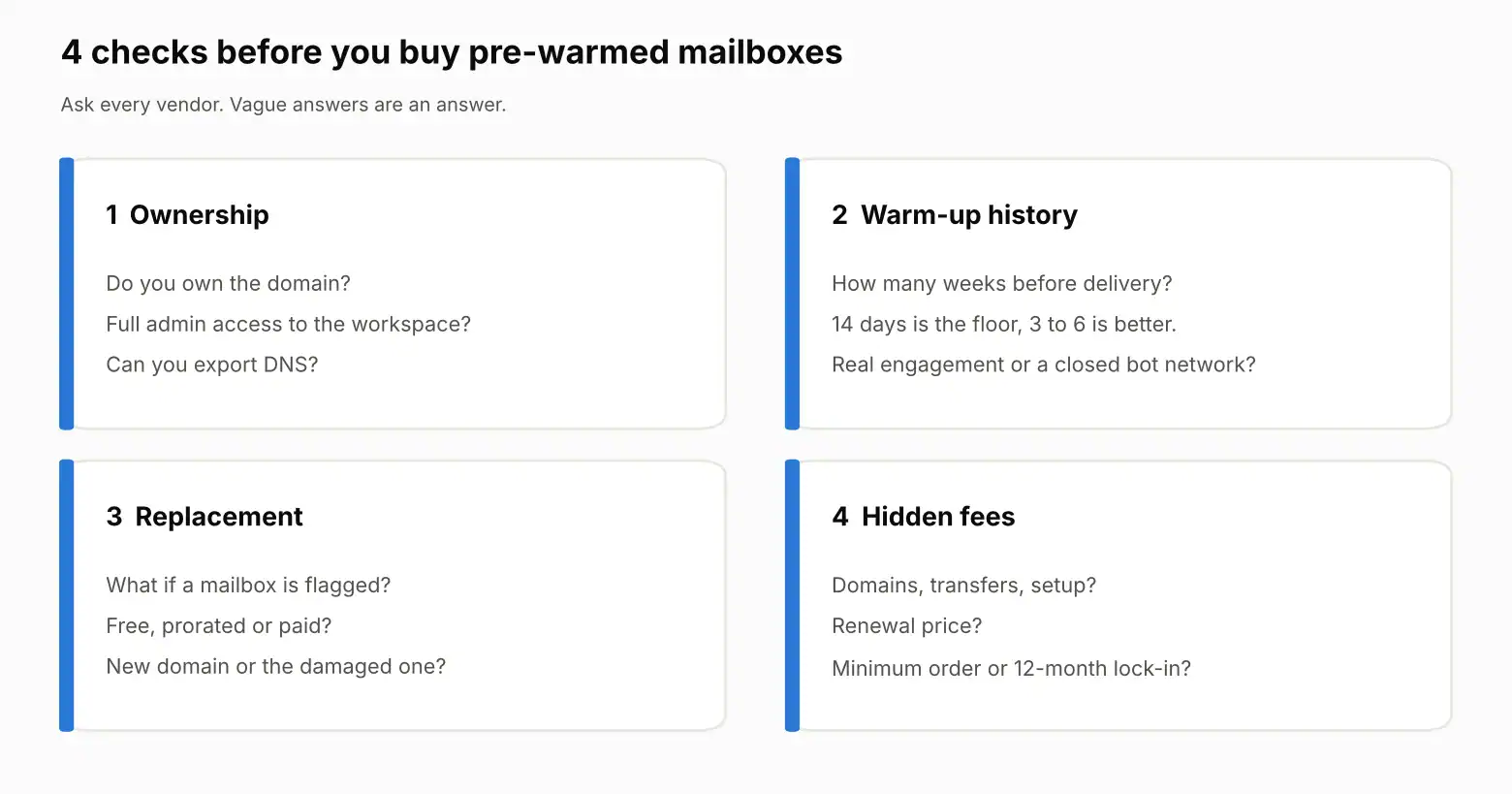
Ownership
- Do you own the domain, or does the vendor retain control?
- Can you access the domain registrar directly and export DNS?
- Do you get full admin access to Google Workspace or Microsoft 365?
- Can you reset passwords and change recovery information?
Warm-up history and quality
- How many weeks was the mailbox warmed before sale? 14 days is the minimum. 3 to 6 weeks is better.
- Was the activity real engagement or automated bot traffic? Providers should be able to explain their methodology.
- Was the domain used by previous customers?
- What sending volume was used during warm-up, and is the warm-up network shared across all their customers?
- Does warm-up keep running after you start sending?
Mailbox provider
- Is it Google Workspace or Microsoft 365? They perform differently (see the comparison below).
Replacement policy
- What happens if a mailbox gets flagged or suspended?
- Is replacement free or prorated, and how quickly does it arrive?
- Does replacement use a new domain or the damaged one?
Hidden fees
- Is there a separate domain purchase or transfer fee?
- Are there setup fees or activation charges?
- What’s the annual renewal cost?
- Is there a minimum order quantity or a 12-month commitment?
I learned most of these the hard way. One vendor charged me $15 to transfer a domain that was supposedly “included” in my purchase. Another required a 12-month commitment that wasn’t mentioned until checkout.
Buy Pre-Warmed Mailboxes on Sbl.so
Here’s what we sell and how it works.
- $9/month per pre-warmed mailbox: Google Workspace mailboxes from a pool that has been warming for 6+ weeks with 98%+ health scores. Ready the same day.
- $6/month per on-demand mailbox: we run the warm-up for you, and the mailbox is available for outreach after 14 days.
- No domain fees: the domain and DNS are included in the mailbox price.
- No caps: buy unlimited on-demand mailboxes, unlimited pre-warmed mailboxes, and import unlimited existing mailboxes for free.
- Flagged mailboxes are replaced as part of the service.
- Platform from $99/month. That’s the minimum, and it stays the same as you scale.
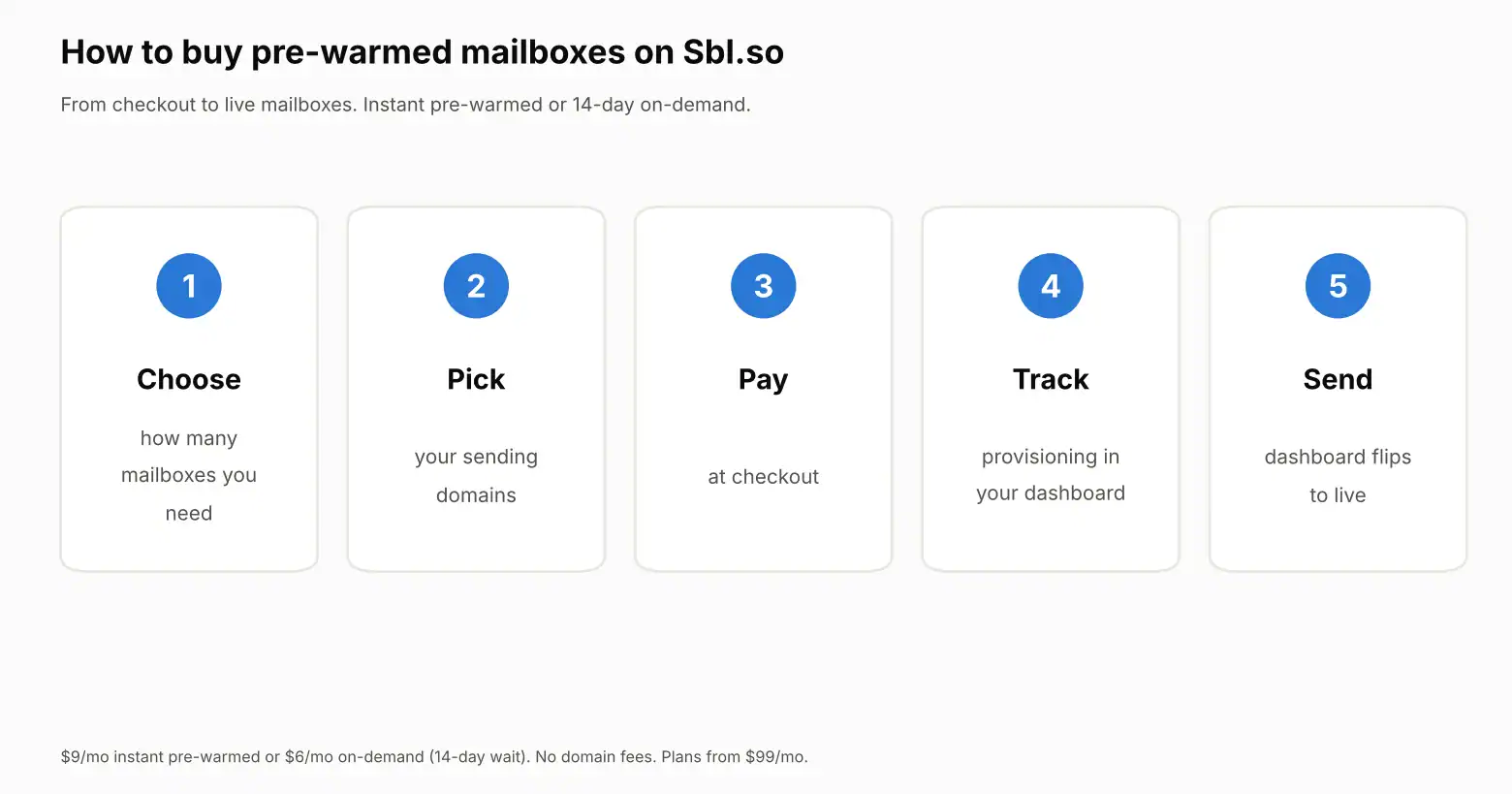
How buying works: choose how many mailboxes you need, pick your domains, pay at checkout and track provisioning in your dashboard. When the mailboxes are ready, the dashboard flips to live.
What the platform fee includes
Sbl.so isn’t just selling you infrastructure. It’s a complete AI sales automation platform. With your mailboxes you get:
- Automated warm-up: even pre-warmed accounts need ongoing warm-up to maintain reputation. It keeps running alongside your campaigns.
- Mailbox rotation: when one mailbox hits its daily limit, the next takes over.
- Email sequencer: each email is generated from your lead variables and queued individually, with smart follow-ups in the same thread or as a new email.
- Unified inbox: replies from every mailbox land in one place, the same chats tab as LinkedIn and WhatsApp. No switching between 10 Gmail accounts.
- AI reply handling: when prospects reply, AI continues the conversation, handles objections, qualifies leads and books meetings. You can monitor every chat and take over anytime. If the AI hits something it can’t handle, it flags “Human Intervention Required” instead of making up a wrong answer. That’s the safety rail that matters when you’re running 50 mailboxes.
- Intent signal lead generation: find prospects showing buying signals right now. Someone just raised funding? They’re probably hiring and buying tools. Someone moved into a VP role? They’re evaluating vendors. Someone’s engaging with your competitor’s content? They’re in-market.
- Your own lists: upload leads as a CSV.
- Multichannel workflows: if someone doesn’t reply to your email, follow up automatically on LinkedIn, or on WhatsApp if you have their number, without losing conversation context.
Want the full workflow? Read our cold email outreach guide.
Buy pre-warmed mailboxes on Sbl.so
Buy Pre-Warmed or Warm Your Own?
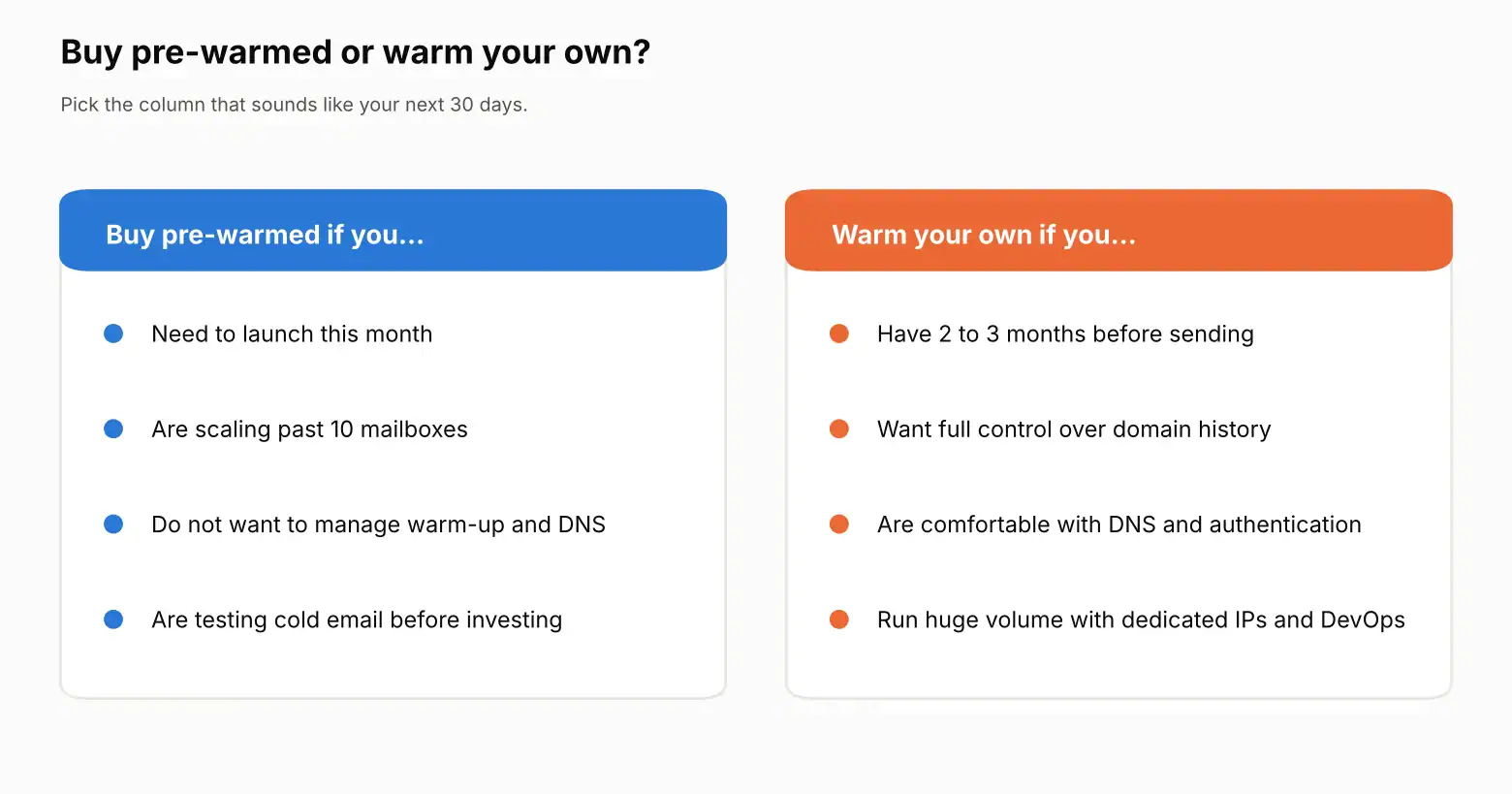
Buy pre-warmed if:
- Speed matters: your sales team is ready to prospect and you can’t afford a month of waiting.
- You’re scaling: adding 10 to 20 new mailboxes and you don’t want to manage warm-up for each.
- Technical resources are limited: nobody on the team manages DNS, authentication and warm-up tools.
- You want operational simplicity: one vendor, one bill, one dashboard beats juggling five tools.
- You’re testing the channel: you want to validate cold email before investing in infrastructure.
Warm your own if:
- You have 2 to 3 months before you need to send.
- You want maximum control: full control over domain history, enterprise security or compliance requirements, or integration with existing systems.
- You’re comfortable managing DNS and authentication, or you have a DevOps team for it.
- You send at massive scale (tens of thousands of emails a day) with dedicated IPs, where owning infrastructure can be cheaper than per-mailbox pricing.
- Your volume is low enough that manual setup isn’t painful.
I started by warming my own mailboxes. It took forever. Now I buy pre-warmed because the time savings are worth more than the premium. But maybe that’s different for your situation.
What Pre-Warmed Mailboxes Can and Cannot Do
Pre-warmed mailboxes CAN:
- Reduce or eliminate the initial warm-up wait
- Give you a better starting reputation than a fresh account
- Let you begin outreach faster
- Improve initial deliverability rates
Pre-warmed mailboxes CANNOT:
- Guarantee inbox placement forever
- Compensate for bad targeting or irrelevant messaging
- Send unlimited volume without consequences
- Replace proper authentication setup
- Fix a fundamentally broken offer
Common misconceptions
“Pre-warmed means spam-proof.” No. Once you take over the mailbox, your sending behavior determines future reputation. High bounce rates, spam complaints, volume spikes and poor content will all tank it. Think of it like buying a car with a clean maintenance record. The previous owner took care of it, but you can still destroy the engine if you drive recklessly.
“I can send unlimited volume immediately.” Also no. Even a well-warmed inbox tops out around 40 to 50 cold emails a day. I’ve seen teams buy pre-warmed infrastructure and immediately blast 500 generic emails a day. They burned the accounts in a week. The warm-up gave them a head start, not immunity.
“Old domains equal good reputation.” A domain that sat unused isn’t building trust while dormant. Recent, consistent, positive activity is what counts.
“Automated warm-up equals genuine engagement.” Warm-up networks are mostly inboxes talking to each other in a closed loop. Think of automated warm-up as establishing a baseline, not peak reputation.
“Pre-warmed replaces authentication.” You still need SPF, DKIM and DMARC. Google, Yahoo and Microsoft have all tightened requirements since 2024. A pre-warmed inbox with broken authentication still lands in spam.
“The vendor’s 94% inbox placement will be my number.” Those claims come from controlled tests with optimal conditions. Real campaigns with real prospect lists and real sales messaging perform differently.
The Aged Email Account Trap
There’s a black market for aged email accounts. People sell old Gmail or Outlook accounts that were created years ago. The pitch is that age equals trust. Don’t fall for it.
Aged accounts from random sellers often have:
- Unknown prior usage (maybe they were spamming before)
- Compromised credentials that could be recovered by original owners
- Prior spam history that you’re inheriting
- No legitimate warm-up activity
- Terms of service violations that could get them suspended
Inheriting someone else’s spam history is worse than starting fresh. Stick with legitimate providers who create accounts specifically for cold email, warm them properly and can document the process.
How Many Mailboxes and Domains Do You Need?
Divide your target daily volume by 25. That’s your minimum mailbox count.
- 250 emails a day needs about 10 mailboxes
- 500 a day needs about 20
- 1,000 a day needs 25 to 40, not one magic account
Most providers recommend 2 to 4 mailboxes per domain. Some push up to 5. Concentrating too many mailboxes on one domain increases the impact of a reputation problem: if that domain gets flagged, all its mailboxes go down together. I typically run 3 per domain. It balances cost against risk. I’ve seen teams run 5 per domain successfully with careful volume management.
So you’re not just scaling mailboxes. You’re scaling domains too, and that’s where per-domain fees really add up with most vendors.
Google Workspace vs Microsoft 365 Mailboxes
Neither is universally better. The right choice depends on your recipient mix.
Google Workspace typically takes 14 to 16 days to warm up. It has strong deliverability to other Google users, and the interface is familiar to most teams.
Microsoft 365 takes 17 to 21 days but may perform better when reaching corporate recipients on Outlook infrastructure.
I’ve run campaigns on both. Across 47 campaigns, Google Workspace did slightly better for SaaS and tech audiences, and Microsoft 365 did better for enterprise and traditional B2B. If your list is mixed, run both and compare placement by recipient provider after the first week.
Safe Daily Sending Limits
This is where most teams get it wrong. They hear pre-warmed and think unlimited.
- First week: 20 to 25 emails per mailbox per day, even on pre-warmed accounts. Monitor placement, bounces and complaints.
- Steady state: 25 to 30 per mailbox per day.
- Ceiling: 40 to 50 only with exceptional engagement and clean lists. Going higher requires more mailboxes and constant monitoring.
I’d rather run more mailboxes at lower volume than fewer at high volume.
What Actually Matters for Deliverability
Pre-warmed inboxes help, but they’re one piece.
Authentication is non-negotiable. Every sending domain needs SPF (authorizes your sending servers), DKIM (cryptographically signs your messages so they can’t be tampered with) and DMARC (tells receiving servers what to do with messages that fail checks). Good providers configure this before delivery, but “configured” and “configured correctly” are different things. Verify with a checker like MXToolbox or Mail-tester before your first send. Step-by-step setup is in our SPF, DKIM and DMARC guide.
Complaint rates matter more than volume. Keep spam complaints below 0.10%. Above 0.30% you’re in trouble. One person hitting “report spam” can hurt more than 100 successful deliveries help.
Bounce rates kill sender reputation fast. Keep hard bounces under 2%. Verify every list yourself before sending. A “verified” list from some random vendor doesn’t count.
Sending patterns need to look human. 50 emails at exactly 9:00 AM every day looks automated. Randomize send times and vary days.
Reply engagement is the strongest positive signal. Genuine conversations are the clearest sign to email providers that you’re legitimate. That’s why targeting matters so much. Irrelevant outreach doesn’t get replies.
How to Launch Your First Campaign on Pre-Warmed Mailboxes
- Verify authentication. Run SPF, DKIM and DMARC checks. Send test emails to Gmail, Outlook and Yahoo and confirm they arrive in the primary inbox.
- Connect your sequencer, built-in or separate.
- Start with a clean list. Verify every email address and remove anything that might bounce.
- Write relevant copy, personalized and specific to the recipient’s situation.
- Set conservative limits: 20 to 25 per mailbox per day initially.
- Keep warm-up running. Don’t switch it off once campaigns start. A portion of warm-up emails flowing alongside cold outreach maintains positive signals.
- Rotate mailboxes. When one hits its daily limit, the next takes over. This also spreads reputation risk.
- Monitor daily for the first week, especially complaints. If they tick up, pause and investigate. Don’t power through.
- Scale gradually, only when metrics look healthy.
- Have a backup plan. Some mailboxes will get damaged despite doing everything right. Budget for replacements.
The best pre-warmed mailbox in the world can’t save a campaign with bad targeting or lazy copy. Infrastructure is the foundation, not the whole building.
How to Check Deliverability After Launch
Don’t rely on your vendor’s warm-up dashboard. Track real campaign metrics:
- Delivery rate: what percentage actually gets delivered
- Hard bounce rate: over 2% means list quality issues
- Spam complaints: under 0.10%, and any spike triggers a review
- Inbox placement: use testing tools to check primary vs spam. Aim for 85%+. At 50% or lower, something is wrong: the mailbox reputation degraded, your messaging triggers filters or your list has quality problems.
- Positive reply rate: are people actually engaging?
Set up Google Postmaster Tools on every sending domain. It shows you directly how Gmail views you.
Common Mistakes When Buying Pre-Warmed Mailboxes
1. Ignoring total cost. Teams see “$4 mailbox” and don’t calculate domains, sequencer and warm-up costs until they’ve already committed.
2. Sending at full volume immediately. Pre-warmed doesn’t mean infinite capacity. Ramp cautiously after you take ownership.
3. Not verifying ownership. Some vendors retain admin access to “their” mailboxes. You’re renting, not owning. Confirm what access you actually get.
4. Skipping DNS verification. A vendor saying SPF and DKIM are configured doesn’t mean they’re configured correctly.
5. Using the primary company domain. Never run cold outreach from your main business domain. Use a separate outreach domain so a flagged domain never touches your transactional and support email.
Email Alone Is Getting Harder
Providers are getting smarter and enforcement is increasing. What worked in 2022 is increasingly difficult in 2026. Cold email isn’t dead, but treating it as your only channel is risky.
The teams doing best right now combine LinkedIn outreach, email and sometimes WhatsApp into coordinated sequences. If someone ignores your email, you follow up on LinkedIn. If they’re active on WhatsApp, you reach them there. Most AI sales tools are single-channel. With Sbl.so the pre-warmed mailbox becomes one channel in a coordinated system that shares context and conversation history, at no extra platform cost.
Pre-Warmed Mailbox FAQ
Where can I buy pre-warmed mailboxes?
From mailbox providers (Puzzle Inbox, LiteMail, Zapmail, Getlead), full platforms (Instantly, Infraforge) or a complete outreach system like Sbl.so. The right pick depends on whether you already run a sequencer. See the cost tables above.
How much do pre-warmed email accounts cost?
Mailboxes run $4 to $10 a month each. The full setup costs more once you add domains, a sequencer and warm-up. For 20 mailboxes expect roughly $140 to $300 a month all-in, depending on the stack. On Sbl.so, 20 Google Workspace mailboxes cost $120 to $180 plus the $99 platform fee.
Can I start sending right away?
With pre-warmed mailboxes from a good provider, yes. On Sbl.so they’re ready the same day. But start conservatively: 20 to 25 emails per mailbox per day for the first week, then scale on performance.
How many emails can a pre-warmed inbox send per day?
25 to 30 is the safe steady state. 40 to 50 is a ceiling, only with clean lists and strong engagement.
How long should warm-up history be?
14 to 21 days is the commonly cited minimum. Some providers run 4 to 6 weeks or longer. Longer generally means better established reputation, with diminishing returns after a month or so.
How long does pre-warming last?
The warm-up history is permanent, but reputation degrades if you don’t maintain good sending practices. Ongoing warm-up helps maintain health between campaigns.
Does a pre-warmed inbox guarantee inbox placement or bypass spam filters?
No. Email providers evaluate ongoing behavior, not just historical reputation. Your content, targeting, sending patterns and recipient engagement all still matter.
Do I still need SPF, DKIM and DMARC?
Absolutely. Pre-warming doesn’t replace authentication. In 2026, proper DNS authentication is table stakes.
What’s the difference between pre-warmed and aged?
Aged refers to account creation date. Pre-warmed refers to active engagement history. An old account with no activity isn’t valuable for cold email.
Should I use my main company domain?
No. Use separate sending domains to isolate reputation risk. If cold outreach damages a secondary domain, your main email keeps working.
Is automated warm-up as good as real engagement?
Not exactly. It’s artificial activity within a closed network. Real engagement from actual prospects is a stronger signal.
What if my pre-warmed inbox starts landing in spam?
Stop sending immediately. Check authentication, review recent bounces and complaints, and test with fresh recipients. Sometimes the damage is recoverable, sometimes the inbox needs replacing. Don’t keep sending into spam. You’ll make it worse.
What happens if a mailbox gets flagged?
Good providers include replacement policies. Sbl.so replaces flagged mailboxes as part of the service. Before buying from any provider, confirm their replacement terms.
The Bottom Line on Buying Pre-Warmed Mailboxes
The 4-week warm-up wait is real. It costs pipeline, frustrates sales teams and delays revenue. Pre-warmed mailboxes solve that by giving you accounts with established reputation from day one.
But they’re not magic. You still need clean lists, relevant targeting, compelling copy, proper authentication and conservative sending limits. A pre-warmed inbox just gets you to the starting line faster. The bigger leverage is in your targeting and messaging.
Pick a provider that fits your workflow. If you just need raw mailboxes and already have a sequencer you love, Puzzle Inbox or LiteMail are affordable. If you’re already in the Instantly ecosystem, their pre-warmed accounts integrate smoothly. If you want mailboxes, sequencing, AI reply handling and LinkedIn and WhatsApp outreach on one fixed platform fee that doesn’t grow as you scale, Sbl.so is built for that.